Chapter 3 · Modifier Reference
3.5TenPix Wind
TenPix Wind is a wind made for cloth: a space warp of its own that blows on every face of the cloth as air. A steady wind carries gusts of real sizes that travel with it, so a cloth moves in soft swells that pass across it and never shows a fixed pattern. Its dials are in real units: the speed in metres per second, the gusts in percent of the speed and in metres. A cloth behind something - a fold, a back panel, a wall - gets slower, gustier air: the wind shadow. Pick the TenPix Wind into a Tnpix Forces list, as any space warp; it acts on that cloth as air.
Location: Create panel ▸ Space Warps ▸ TenPix ▸ TenPix Wind. Click and drag in a viewport: the icon, its arrow along the drag. Then pick it into the cloth's Tnpix Forces list (Modify panel ▸ Tnpix Forces ▸ Add).
A 3ds Max Wind in a Tnpix Forces list acts with its own 3ds Max force, like every other space warp. Only a TenPix Wind is air. A cloth whose Tnpix Forces lists no TenPix Wind moves through no air at all.
Interface
Air rollout
- Mode Default Automatic
- Automatic: TenPix makes the air - steady wind plus gusts of real sizes that travel with the wind. Map: a 3ds Max map you pick shapes where and how hard it blows (white = the full Speed, black = none) - the Map rollout below.
- Type Default Planar
- Planar: one direction, the icon's arrow. Fan: a jet from the icon - fastest on its axis, slowing with distance, spreading by Spread. Point: from (or, with a negative Speed, into) the icon in every direction, thinning with distance.
- Speed (m/s) Default 5
- The wind's speed. 1 a light air, 5 a moderate breeze, 15 a near gale. For a Fan: the speed where it leaves the fan.
- Wander (deg) Default 10
- How far the wind's direction drifts back and forth over time. Outdoors about 10 - 20.
- Falloff (per m) Default 0
- How the wind fades with distance from the icon: 0.1 leaves 37 % of it 10 m away. 0 = the same everywhere.
- Seed Default 1
- Another seed, another set of gusts - the same every bake.
- Fan size (m) / Spread (deg) Defaults 0.6 / 10
- Fan only: the fan's diameter, and how wide its air spreads (a real fan: about 5 - 10).
- Point core (m) Default 0.3
- Point only: inside this radius the air does not get faster - no point of infinite wind.
- Status lines
- The wind's mean speed and its gusts at the cloth it reached, how many cloths in how many Tnpix Solvers, and the share of their faces in its shadow - the last simulated frame's.
Gusts rollout
- Terrain Default Open land
- Sets Gust strength and Biggest gust from measured wind near the ground: Open land, Suburb, City. Custom keeps yours.
- Gust strength (% of Speed) Default 22
- How strong the gusts are on top of the Speed. Open land about 22, a suburb 32, a city 43.
- Biggest gust (m) Default 15
- The size of the gusts that carry the strength. Smaller gusts come with them, as in real wind.
- Gust life (x) Default 1
- How long a gust keeps its shape while it travels: 1 = as real air, more = steadier, less = more restless.
- Smallest gust: auto Default on
- Gusts smaller than this are left out. Auto: four of the cloth's own edges - smaller ones it could not show. Clear it to type the size in metres.
| Terrain | Gust strength (% of Speed) | Biggest gust (m) | Where |
|---|---|---|---|
| Open land | 22 | 15 | a field, a beach, a rooftop |
| Suburb | 32 | 9 | houses, trees, a park |
| City | 43 | 6 | streets between buildings |
| Custom | yours | yours | any change to the two dials |
Map rollout
Map mode only (greyed on Automatic). The map shapes the wind: where it is white the full Speed blows, where it is black none, grey in between - and the air goes on to the cloth exactly as Automatic's does (the patch, the push, the wind shadow), so a fine map makes the cloth shiver; it does not print on it.
- Map Default none
- Any 3ds Max map, OSL maps included. White = the full Speed, black = no wind. With no map, Map mode blows the full Speed everywhere.
- Direction Default none
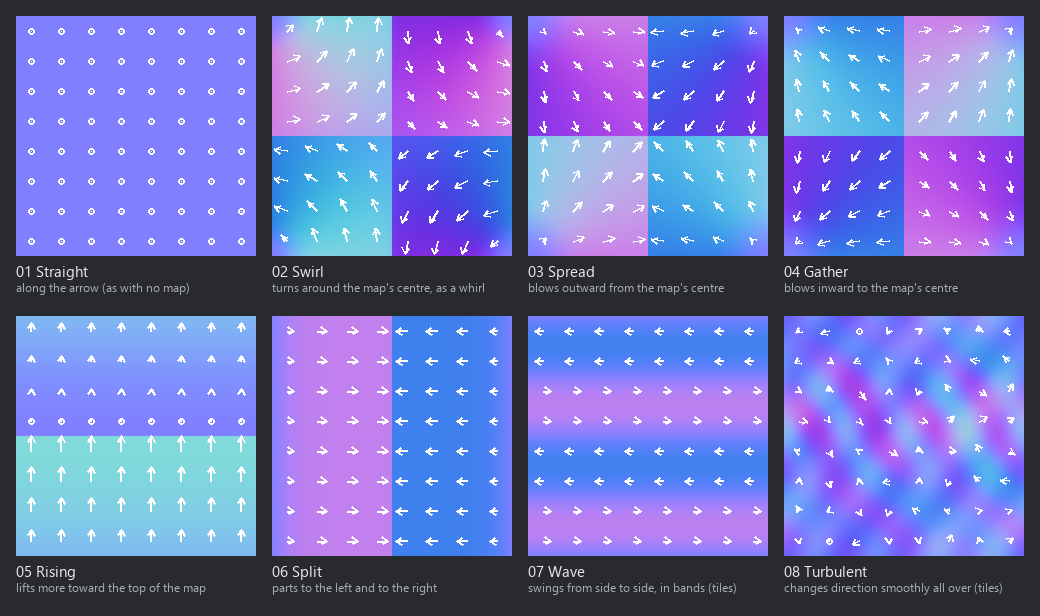
- Optional: a colour map that turns the wind, read in the map's own frame: red runs across the map, left to right (the icon's X), green up the map, bottom to top (the icon's Y), blue along the arrow; each colour from 0 to 1 means -1 to +1. A flat (128, 128, 255) blows along the arrow; the speed is the Map's. Turning the icon about its arrow turns the pattern and its directions together. Ready-made direction maps, OSL and PNG, come with TenPix Cloth: see Direction map samples below.
- Projection Default Along the wind
- Along the wind: the map is projected from the icon along its arrow, like a projector. 3D around the icon: the map is read in 3D in the icon's own space (move, turn and scale the icon to place it).
- Map size (m) Default 2.0
- How big one repeat of the map is. A 2D map (a Bitmap, a Gradient) repeats at this size; a 3D map that reads XYZ coordinates (a Noise or a Cellular on Object XYZ) keeps its own size, in scene units - set it on the map.
- Travel with the wind Default on
- On: the pattern moves at the wind's Speed. Off: it stays where you put it.
- Gusts on top Default off
- Map mode: add the Automatic gusts on top of the map.
How the map is read. Along the wind, it is read over the cloth's place on the icon's plane; 3D around the icon, in a box around the cloth. With Travel, the pattern is carried from the icon at the wind's Speed: a 3D map (a Noise, a Cellular) sweeps through the cloth along the arrow, as gusts do; a 2D map (a bitmap, a gradient) projected along the wind holds its place, and only its own animation moves it. The rollout's last line tells what the last read did. A map that nothing moves (Travel off and the map not animated) is read once in total; an animated map, or Travel, is read once a frame - that time is added to each frame. Editing the map re-simulates the cloth, as editing any dial does; after an edit of a map that moves, or when the scene opens, the first frame takes a moment longer while the map is looked over along the timeline.
Where the map sits. A 2D map's 0, 0 is on the Wind's arrow and one map is Map size across, so a pattern centred on 0, 0 is centred on the arrow. The colours of the Map and the Direction map are taken as they are: load a picture as data, not as a colour image.
Direction map samples. TenPix Cloth installs eight direction maps in its samples\Wind direction maps folder, each as an OSL shader and as a PNG picture: Straight, Swirl, Spread, Gather, Rising, Split, Wave and Turbulent. For an OSL one, add an OSL Map, load the file and put the map in the Direction slot. Every OSL sample is centred on the arrow and has its own settings (how far it turns, its centre, how soft), a UVW input, and a Time input in seconds that follows the time slider on its own, so a pattern can move by itself: Straight's Sway swings the whole wind, Drift moves Swirl, Spread, Gather, Rising, Split and Turbulent, Wave's bands travel and Turbulent's swirls change. Every setting can be animated. Each file explains the colour code, so any of them is a start for a direction map of your own.
Air running along a cloth's surface grips it through Drag along; air that meets it face on, through Push across. A flat sheet that faces the wind shows a swirl only faintly; a flag, folds and garments, whose faces meet the turned air, show it clearly.
Wind shadow rollout
- Shadow Default on
- Cloth behind something gets slower, gustier air.
- From the cloths in this Solver Default on
- Every cloth on the same Tnpix Solver shelters the others - and itself: a fold, a back panel, an inner layer. Cloths on another Solver do not shelter these.
- From the Solver's collision objects Default on
- The bodies this Solver already collides with shelter the cloth too - no need to pick them again.
- From these objects / Add / Remove
- Anything else that blocks this wind: a wall, a building, a prop the cloth never touches. Read every frame; a deforming object adds time to each frame.
- Length (m) Default 2
- How far behind a shelter the air is slowed. Real air recovers over about 20 times the shelter's size.
- Softness (deg) Default 10
- Softens the shadow's edge.
- Shelter (%) Default 75
- How much slower the air is right behind a solid shelter: 75 = a quarter of the wind gets through.
On the cloth rollout
- Patch: auto Default on
- The cloth reads the air over a patch this big, so a gust smaller than the patch cannot push one spot alone. Auto: four of the cloth's edges. Clear it to type the size in metres.
- Push across Default 1.2
- How hard the air pushes a face that meets it square on (a flat plate: 1.2).
- Drag along Default 0.02
- How hard the air drags along the cloth's surface (smooth fabric: 0.02).
- Angle Default Measured
- Measured: a tilted patch is pushed as measured on flat plates (a sail fills). Simple: the push grows only with how squarely the face meets the wind.
- Smooth the cloth's speed Default on
- The push reads the cloth's speed smoothed over the patch, so small movements of single points do not turn into wind. Clear it and each face reads its own speed.
Display rollout
- Icon size (m) Default 1
- The icon's size in the viewport only. A Fan's disc and a Point's rings keep the fan's and the core's real size.
- Show the map Default on
- Draws the map on the icon (Map mode).
How the cloth moves in it
- Toward the wind's speed, never past it. A sheet face-on to the wind picks up most of the wind's speed; turned edge-on it slices through and is carried far less.
- Still air. Where the wind does not blow, the air is still and slows the cloth's own motion: a sheet falls slowly face-first, and slips down edge-first.
- The same every bake. The gusts come from the Seed: two bakes of the same scene are the same, point for point.
- Binding. 3ds Max's Bind to Space Warp takes a TenPix Wind, as it takes any space warp, and the binding moves nothing: a TenPix Wind acts on a cloth only through its Tnpix Forces list.
The TenPix Graph shows each TenPix Wind a Tnpix Forces lists as a blue box beside that Forces, with all its dials (Chapter 2).