Chapter 3 · Modifier Reference
3.5Tnpix Collision
The Tnpix Collision modifier lists the objects the cloth collides with. It sits on the cloth's stack, and each row of its list has its own settings, so a body can be slippery while a belt grips, and a hero prop can use its full mesh while a background collider is simplified. The list is group-wide: rows picked on any member of a Solver group are merged and duplicates are dropped. A Tnpix Soft Body collides with the objects of its own Collision modifier the same way, on a Solver of soft bodies only as well as beside cloth.
Location: Select the cloth object ▸ Modify panel ▸ Modifier List ▸ Tnpix Collision
To make the cloth collide with an object:
- Select the cloth and add Tnpix Collision (or select the instance your Solver group already shares).
- Click Pick Object and click the object in a viewport, or click From List to pick it by name.
- With the row selected, set its Thickness, Friction and other settings in the Selected Object and Surface Response groups.
Interface
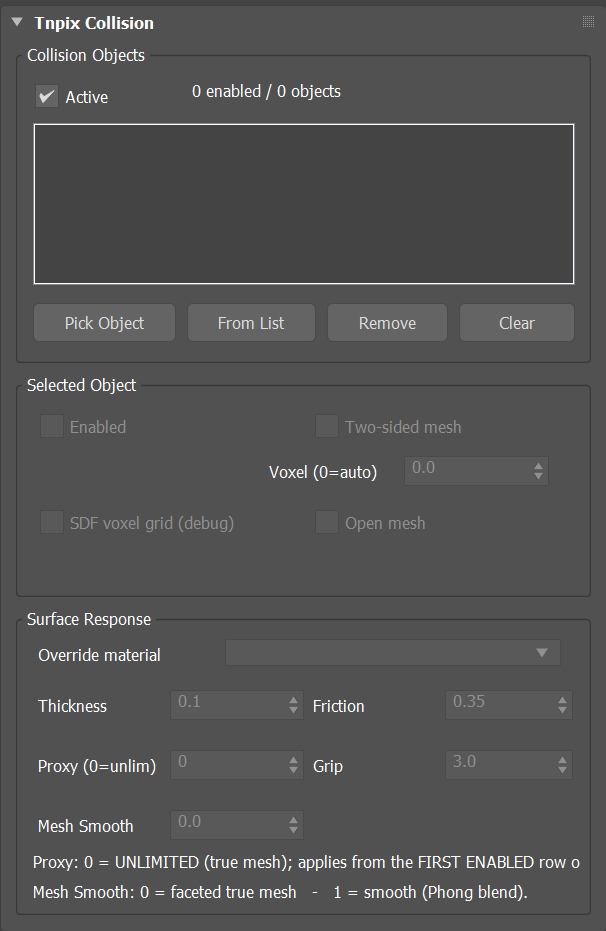
Tnpix Collision rollout
Collision Objects group
- Active Default on
- Turns every collider in the list off at once, without removing any.
- Header
- Shows how many colliders are enabled and how many are listed, for example 2 enabled / 3 objects.
- List
- Everything this cloth may collide with. An object only pushes the cloth once it is in this list; being nearby in the scene is not enough. Select a row to edit its settings below.
- Pick Object / From List
- Add a collider by clicking it in a viewport, or by name. While Pick Object is active the button stays highlighted; click it again or right-click in a viewport to stop. A collider must be geometry that converts to a mesh; an object already in the list is not added twice. The cloth that carries this Collision modifier (every object it is instanced on) cannot be its own collider: Pick Object does not accept it and From List leaves it out.
- Remove
- Takes the selected collider out of the list. The object stays in the scene.
- Clear
- Empties the list. The objects stay in the scene.
Selected Object group
- Enabled Default on
- Turns this one collider off, leaving the rest of the list alone.
- Two-sided mesh
- Contact on both sides of this collider's surface, for thin sheets and single-sided props.
- Open mesh Default on
- For an open mesh that still has an inside, such as a character with holes. The outward side is kept, and cloth that got through is pushed back out. Holes stay open. A new row starts with it on; a row saved in a scene keeps its own setting.
- Voxel (0=auto) Default 0
- The resolution of this collider's volume field, used by the volume-based collision systems. 0 chooses it automatically and is right almost always.
- SDF voxel grid (debug)
- Draws this collider's volume grid in the viewport. Diagnostic only.
Surface Response group
- Override material Default Off
- Decides whether this row's friction and grip
or the cloth's materials apply where they touch.
Off A material that sets friction and grip uses its own values; where no material sets them, this row's values apply. Unpainted cloth only This row's values apply to cloth that no material covers; a material wins where it is painted. Everything This row's values apply wherever it touches and the materials are ignored, for example for an ice floor. - Thickness Default 0.1 in
- How far the cloth is held off this surface, in scene units (a new row takes 0.1 inch in the scene's unit). The most common first fix for poke-through: raise it before changing anything else.
- Friction Default 0.35
- How much the cloth grips this surface rather than sliding.
- Proxy (0=unlim) Default 0
- Decimates this collider to a simpler shape for speed. 0 means unlimited: the true mesh, not decimated. The proxy setting is taken from the first enabled row. Greyed on the panel and in the TenPix Graph while every Tnpix Solver this Collision feeds is in Surface (True Geometry): that mode always collides with the true mesh, and only the voxel field of Volume Only, Volume + Proxy and Surface + Volume uses a decimated collider. The number is kept and acts again when the Solver goes back to one of those three. A Collision shared by Solvers in different modes stays live while any one of them is in a voxel mode; on an object with no Solver it stays live.
- Grip Default 3.0
- An extra holding force for surfaces the garment should stay put on. Grip is a multiplier, not a 0 to 1 value: the hold against a body is grip × friction.
- Mesh Smooth Default 0
- 0 uses the faceted true mesh; 1 blends the surface smoothly (Phong). Raise it when the facets of a low-polygon collider print through into the cloth.
Where the cloth is pushed off a collider's own triangles, a collider with hard edges, such as a box or a table, pushes it straight out of the face it touches. Where a corner of the touched triangle leans more than 30 degrees away from that face — the corners along a hard edge — the face's own direction is used, so cloth or a soft body that lands anywhere on a big flat face stays where it lands instead of sliding toward the edge. On a smooth body the corners lean less, and the push is blended across the triangle as before.
To make two garments collide with each other, put them in one Solver group and add Tnpix Self Collision. A garment can also be listed as a collider of another garment; its own simulation is then evaluated for the other's solve, which makes the first frame take longer.