Chapter 3 · Modifier Reference
3.3Tnpix Gravity
The Tnpix Gravity modifier sets the gravity of the simulation. Without a Gravity modifier the Solver group has no gravity and the garments float; nothing pulls on the cloth that you did not add. Add one per Solver group and share it as an instance.
Location: Modify panel ▸ Modifier List ▸ Tnpix Gravity
Interface
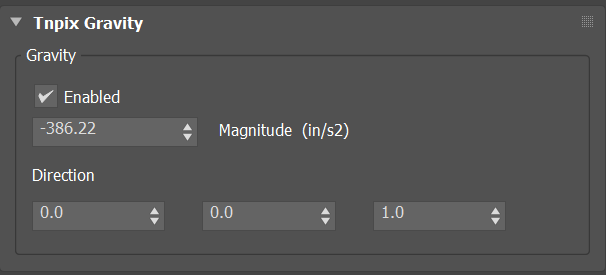
Tnpix Gravity rollout
- Enabled Default on
- Turns gravity off without removing the modifier, so you can compare with no gravity at all.
- Magnitude Default Earth gravity
- The strength of gravity, in system units per second squared, applied along Direction. A new modifier starts at Earth gravity in the scene's unit: −386.22 in an inch scene, −981 in a centimetre scene. A negative value pulls against the direction; a positive value pulls along it, which lifts the garment with the default direction and is a legitimate choice. Animatable.
- Direction Default 0, 0, 1
- The axis gravity acts along. Tilt it for a sideways, wind-like pull. Animatable.
For a reduced-gravity, slow-motion look, lower the magnitude. For a steady sideways pull, tilt the direction.