Chapter 3 · Modifier Reference
3.8Tnpix Material Advanced
The Tnpix Material Advanced modifier exposes the full fabric model: mass, air drag, stretch, bend, plasticity, grain and the stretch limit, each with its own rollout. Its default bend, Shape Memory, keeps the shape the garment was modelled in: every fold returns to the angle it has in the modelled mesh (see Bend Type). A new Advanced material starts as the Medium Fabric preset with the stretch limit on at 5 percent, so every row shows a value that is in force.
Location: Modify panel ▸ Modifier List ▸ Tnpix Material Advanced
The rollouts are Presets (see Tnpix Material Standard), Channel (Tnpix), Material, Geometry / Physical, Drag, Stretch, Bend and Advanced. Channel (Tnpix) sits directly under Presets and opens expanded, so the channel binding is the first setting you see. Controls that the chosen mode does not use are shown unavailable.
Ticks: "I chose this value"
Several rows carry a check box beside the value (Relative Damp, Fold Body, the grain ratios, Friction and Grip). The tick is the statement I chose this value. Unticked means nobody has chosen, and the fabric follows the whole-garment behaviour; ticked means you chose the value, even when it happens to be the neutral one. Clearing a tick keeps your number: the field is unavailable, the value stays, and ticking again brings it straight back.
A new Advanced material starts with Relative Damp (0.01), Friction (0.35) and Grip (3.0) ticked, the same values as Tnpix Material Standard. A saved scene opens with the ticks it was saved with.
Interface
Channel (Tnpix) rollout
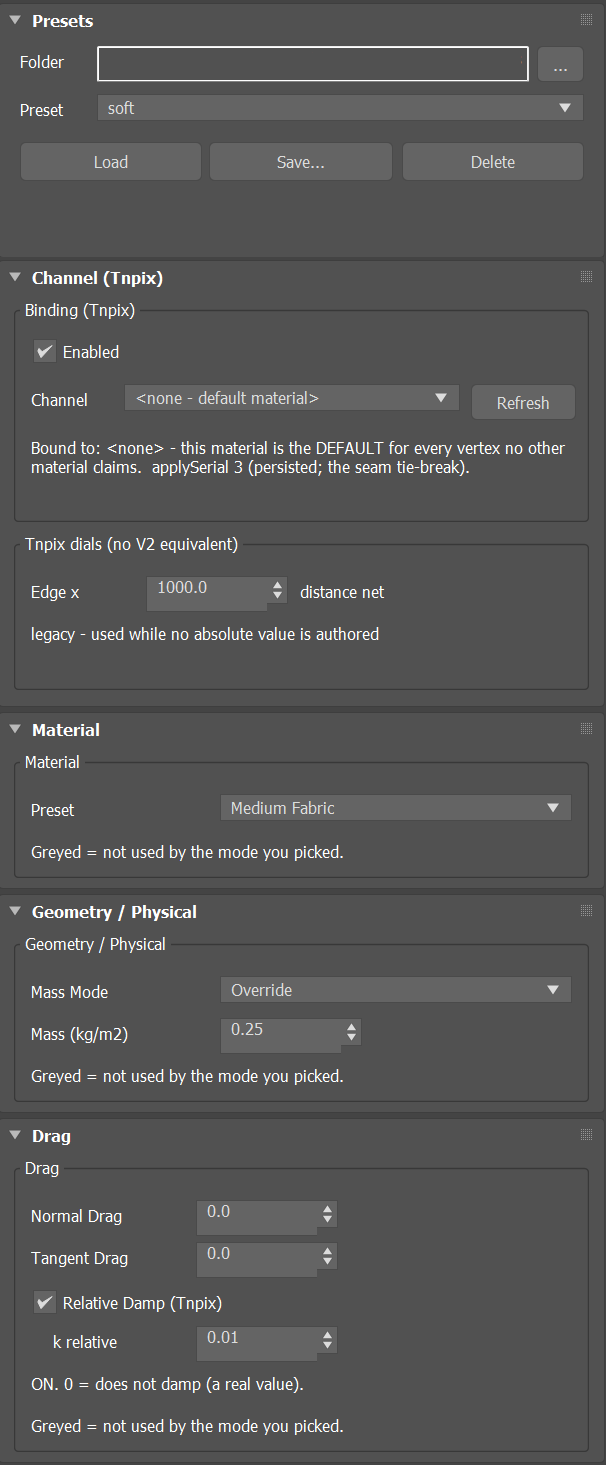
- Enabled Default on
- Turns the material off without removing it. While off it contributes nothing, and the garment behaves as though the modifier were not there.
- Channel / Refresh Default <none - default material>
- Binds this material to a painted channel, so one garment can carry several fabrics. Left at none, the material is the default of its own garment: it covers every vertex of that garment that no material bound to a channel claims. Refresh reads the channel list from the stack again. The line below reports the binding.
An Advanced material whose channel is none covers the vertices of its own garment that no painted material claims; a painted channel keeps every vertex it reaches, soft edges included. On a shared Solver an instanced no-channel material covers each garment it is on, and the no-channel materials of two garments never merge. Give a garment one Advanced material without a channel: with two, only the one created last acts.
Material rollout
- Preset Default Medium Fabric
- Ultra Light Fabric, Light Fabric, Medium Fabric, Heavy Fabric or Leather (Debug). A preset here is an override: it clears every dial and every tick and then writes its own values, so picking Light gives exactly Light with nothing left over. Relative Damp, Friction and Grip are cleared too; tick them again after picking a preset if you want them. The Stretch Type you chose stays: a material on Fabric Curve keeps it, with the curve rows back at their defaults. When you edit a value afterwards, the list reads Custom.
| Preset | Stretch stiffness | Bend stiffness | Shear | Edge | Damping | Mass (kg/m²) |
|---|---|---|---|---|---|---|
| Ultra Light Fabric | 4 × 10 000 | 5 × 10 | 2,000 | 1e+6 | 0.010 | 0.06 |
| Light Fabric | 6 × 10 000 | 1.5 × 100 | 4,000 | 1e+6 | 0.010 | 0.12 |
| Medium Fabric | 1 × 100 000 | 1 × 1 000 | 10,000 | 1e+6 | 0.020 | 0.25 |
| Heavy Fabric | 2 × 100 000 | 4 × 1 000 | 30,000 | 1e+7 | 0.030 | 0.50 |
| Leather (Debug) | 5 × 100 000 | 1.2 × 10 000 | 80,000 | 1e+9 | 0.050 | 0.90 |
Stiffness is written as coefficient × multiplier, as on the Stretch and Bend rollouts.
Geometry / Physical rollout
- Mass Mode Default Override
- Unchanged keeps the mass the fabric already has; Override replaces it with the value below.
- Mass (kg/m2) Default 0.25
- Fabric mass per unit area. It drives how the garment hangs under gravity.
Drag rollout
- Normal Drag Default 0
- The flat-on push of air: what a sheet feels when it is waved broadside. It is strong, so useful values are small. Range 0 to 1.
- Tangent Drag Default 0
- The along-the-surface part of air resistance, felt when cloth slides edge-first. Range 0 to 1. Leaving it untouched is not the same as typing 0.
- Relative Damp (Tnpix) / k relative Default on, 0.01
- Damps each point's movement relative to its whole cloth piece, rather than against the world. It takes the shimmer out of a jittery surface without deadening the garment's overall motion.
Stretch rollout
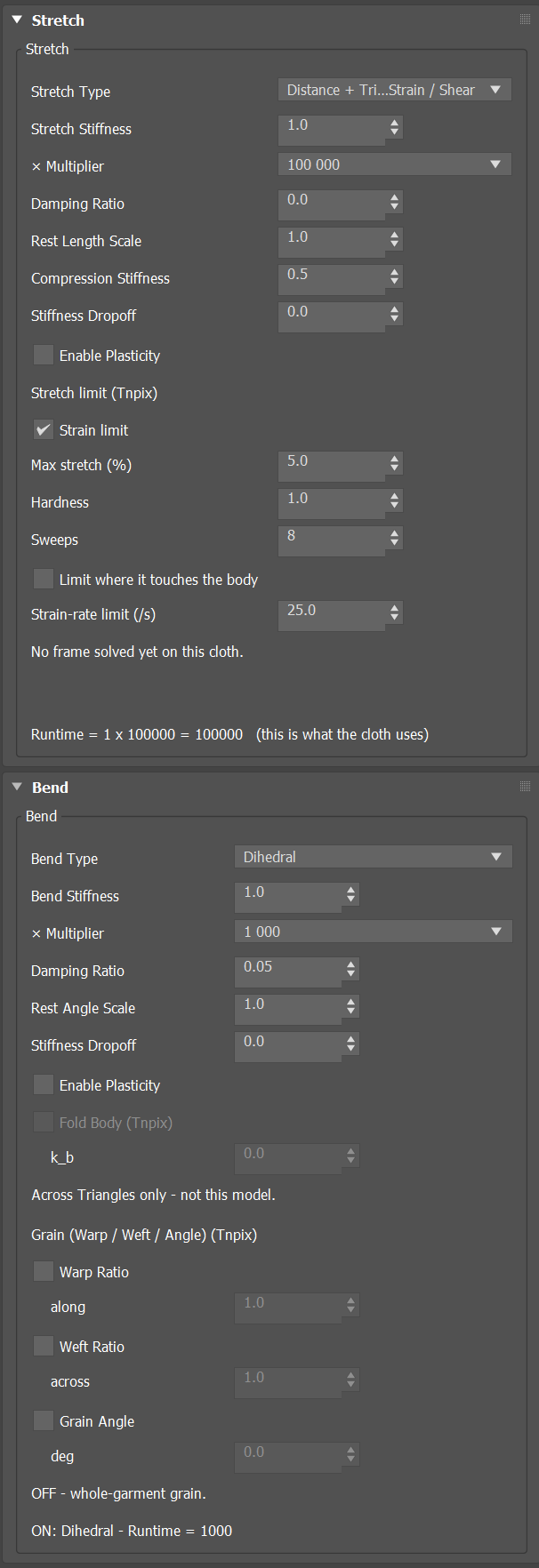
- Stretch Type Default Standard
- How the fabric resists
being stretched.
Standard The edge net and the triangle pass together, at the stiffness set below. The default. Fabric Curve Both passes, but the stiffness follows the curve real woven fabric has: soft for the first few percent of stretch, then locking. Stretch Stiffness becomes the fabric's stiffness once locked. The curve is set in the Fabric Curve (Tnpix) group below. - Stretch Stiffness Default 1.0 × Multiplier Default 100 000
- Membrane stiffness: how hard the fabric resists being pulled. The stiffness is the coefficient times the multiplier, which lets you cover ten orders of magnitude without typing zeros; No Scaling uses the number as written. The product can go from 1e-10 to 1e+10. A change that takes it outside is refused: the box keeps what it had and the line under the Stretch rows says why, for example REFUSED: 1000 x 1e+09 = 1e+12, over 1e+10. To go higher, lower the Stiffness first. Acts on this material's region; regions no channel covers use the whole-garment value.
- Damping Ratio Default 0
- How quickly a stretch oscillation settles. Applies to the whole garment.
- Rest Length Scale Default 1.0
- Makes the fabric sit tighter (below 1) or looser (above 1) than the shape it was modelled at, without editing the mesh.
- Compression Stiffness Default 0
- How much the fabric resists being squashed, as opposed to stretched. Low values let it buckle into wrinkles naturally.
- Stiffness Dropoff Default 0
- Makes the garment firm at the top and progressively softer towards the bottom, for example a skirt stiff at the waist and loose at the hem, without painting. The top is the highest point of the garment's rest pose, so it follows the garment, not the world. Range 0 to 1.
- Enable Plasticity Default off
- Cloth that stays stretched: pulled past a point, it keeps some of the extra length. The amounts are on the Advanced rollout.
Stretch limit (Tnpix)
- Strain limit Default on
- The stretch ceiling of this fabric. On, edges may not lengthen past Max stretch; off, only the stiffness resists.
- Max stretch (%) Default 5
- How far the fabric may stretch beyond its rest length before the ceiling holds it: 5 is denim-tight, 15 is a knit, 100 is no ceiling at all.
- Hardness Default 1
- How firmly the ceiling holds. 1 is a wall; lower values let the ceiling give under a heavy load instead of snapping.
- Sweeps Default 8
- How completely the ceiling is reached in each substep. 8 is one pass and the minimum; above 8 the pass repeats and fewer edges are left over the ceiling. When several fabrics share a Solver, the largest count applies.
- Limit where it touches the body Default off
- Off, an edge whose two ends both touch the body is free of the ceiling, so a fitted garment stays as modelled. On, the ceiling holds there too.
- Strain-rate limit (/s) Default 25
- Caps how fast a taut edge may lengthen, in rest lengths per second; only impacts reach 25. 0 turns it off for this fabric.
- Status line
- The last solved frame, measured: the largest and mean stretch, the edges held at the ceiling, the edges freed on the body, and whether one more pass would still lower the maximum. When it says the stretch is still converging, raise Stretch quality on the Solver.
Fabric Curve (Tnpix)
Real woven fabric gives easily for its first few percent of stretch, while its yarns straighten, and then locks once they pull taut. With Stretch Type set to Fabric Curve this fabric does the same: below its lock point it is soft, the Stretch Stiffness divided by Lock stiffness; past the lock point it rises smoothly to the Stretch Stiffness itself, the firmness you set. The rows are unavailable under the other Stretch Type and keep their numbers. Each direction has its own lock point: the warp and weft from the rows below, the bias from the angle at which the weave jams, and every edge in between mixes them by its angle to the grain. The grain is the one the Bend rollout's Grain group uses: the garment's grain axis, turned by Grain Angle. The curve shapes stretch and shear only; bending is unchanged. It reads the Grain group only to know which way the warp runs, so turning Grain Angle turns the curve's warp and weft with it.
- Warp soft until (%) Default 2
- How far the fabric stretches easily along the warp before it locks, in percent of the rest length. Woven cottons lock early (1 to 3); knits much later (10 to 30). Range 0.1 to 100.
- Weft soft until (%) Default 4
- The same across the weave. Real weft usually gives more than warp.
- Bias lock (deg) Default 30
- The shear angle at which the weave jams: the lock point of the bias, at 45 degrees to the grain. Woven fabric is soft on the bias, so its lock point is late. Range 1 to 80.
- Lock stiffness (x) Default 500
- How many times stiffer the fabric is once locked than in its soft range. 1 means no curve: the fabric keeps its Stretch Stiffness throughout and runs exactly as Standard. A stiff fabric needs a large number to show a soft range at all: on the stock fabric, 20 changes almost nothing and 500 lets it give its first percent or two. Range 1 to 100,000.
- Lock smoothness Default 0.5
- How gradually the fabric locks, so it never snaps: 0 is a sharp corner at the lock point, 1 locks over a stretch range as wide as the soft range. Range 0 to 2.
- Status line
- Whether the curve is acting on this fabric, and its warp and weft lock points.
The curve acts on this material's region only, like the rest of the Stretch rollout. The Strain limit above still holds as a ceiling past the lock point.
Bend rollout
- Bend Type Default Shape Memory
- The bend model the solver runs.
The rest shape is the garment as it stands on the first frame of the simulation, normally the shape you modelled. Rest Angle Scale and Plasticity act under Shape Memory and Shape Memory (Even), and are unavailable under Basic.Basic A spring across every fold keeps the distance between the outer corners of its two triangles as it is at rest: it holds how deep a fold is, not which way it turns. It is the bend of Tnpix Material Standard. Fold Body acts under this type only. Shape Memory Keeps the angle of every fold, and the side it turns to, as it is in the garment's rest shape. The fabric remembers the shape it was modelled in: a rolled collar, a shaped brim or a sculpted fold comes back after it is pushed, instead of relaxing flat. Shape Memory (Even) Shape Memory, with each fold weighted by the shape of its two triangles at rest, so the fabric bends by its material rather than by how the mesh happens to be triangulated. On an even mesh it is exactly Shape Memory. - Bend Stiffness Default 1.0 × Multiplier Default 1 000
- How strongly the fabric resists folding, as coefficient times multiplier. Acts on this material's region: two materials give two bend behaviours.
- Damping Ratio Default 0
- How quickly a fold settles once it forms.
- Rest Angle Scale Default 1.0
- Scales the fold angles the fabric remembers from its rest shape: 1 keeps them as modelled, 0 makes the fabric want to lie flat, above 1 deepens every fold.
- Stiffness Dropoff Default 0
- The top-to-bottom softening of Stretch, applied to bending.
- Enable Plasticity Default off
- Creases that stay: a fold held past the threshold on the Advanced rollout sets into the rest shape instead of relaxing out.
- Fold Body (Tnpix) / k_b Default off, range 0 to 100
- How much the cloth resists folding as a sheet rather than hinge by hinge. Low values fold loosely and crumple; higher values hold broader, rounder folds. Per material, so two regions of one garment can differ. Above about 100 it no longer changes the cloth visibly, so the field stops there. Used by Basic only; it works toward an unbent sheet, not toward the modelled shape.
Grain (Warp / Weft / Angle) (Tnpix)
Real fabric is not equally stiff in every direction: threads run lengthwise (the warp) and crosswise (the weft), and cloth bends differently along each. These rows act under every bend type.
- Warp Ratio / along
- How much of the bend stiffness runs along the grain. A ratio, not a stiffness: warp 2.0 with weft 1.0 is twice as stiff along the grain as across it. Range 0.1 to 10.
- Weft Ratio / across
- The same ratio across the grain. Warp and weft both at 1.0 means no grain.
- Grain Angle / deg
- Turns the grain direction: the bias cut. A panel cut at 45 degrees drapes quite differently from one cut on the straight grain. Measured in the garment's own frame, so rotating the garment rotates the grain with it. Range −180 to 180.
Advanced rollout
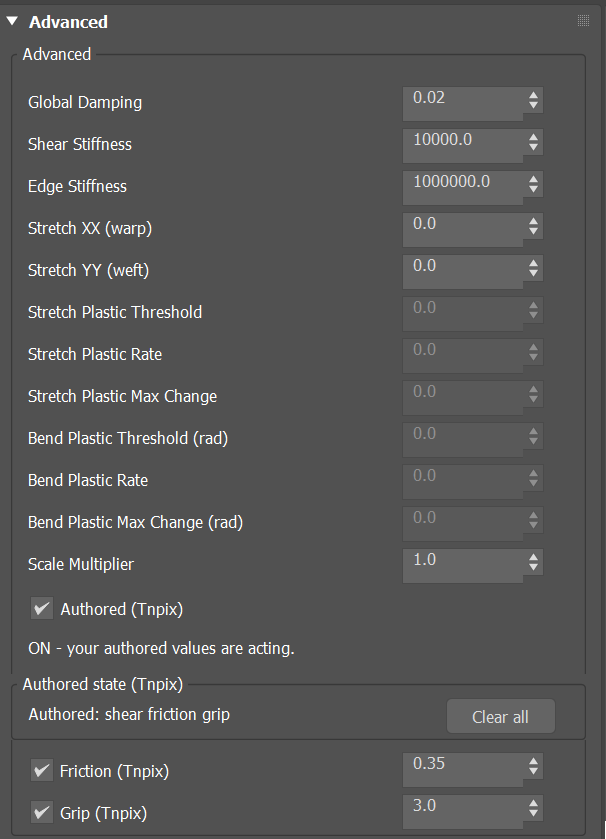
- Global Damping Default 0.02
- Velocity damping. Raise it to settle a jittery garment; too high looks syrupy. Acts on this material's region.
- Shear Stiffness Default 10,000
- How hard the fabric resists being pushed out of square.
- Edge Stiffness Default 1e+6
- The stiffness of the edge net on its own. Cloth is held by the springs along its edges and by its triangle faces; this sets the first, so you can hold the lengths hard and still let the surface give. Acts on this material's region.
- Stretch XX (warp) / Stretch YY (weft) Default 100,000
- Directional stiffness along the warp and across the weft. Equal values give cloth that behaves the same in every direction.
- Stretch Plastic Threshold / Rate / Max Change Default 0.1 / 0.1 / 0.5
- How far the fabric must stretch before any of it stays stretched, how quickly stretch past that point stops coming back, and a ceiling on how much it may permanently give.
- Bend Plastic Threshold (rad) / Rate / Max Change (rad) Default 0.2 / 0.1 / 0.5
- How far a fold must go, in radians, before it starts to set into a crease, how quickly it sets, and a ceiling on how much permanent crease may build up.
- Scale Multiplier Default 1.0
- Moves every stiffness of the fabric together by the same factor, so the fabric keeps its character and only becomes softer or stiffer as a whole.
- Authored (Tnpix) Default on
- Off, the material ignores every value you set and runs pure defaults: a way to compare with "no material" without losing your work. Nothing is destroyed; turning it on brings everything back.
- Authored state (Tnpix) / Clear all
- Shows which stiffness values are set. Clear all withdraws the set stretch, bend and shear stiffness together so the solver falls back to its defaults; the numbers stay in the fields.
- Friction (Tnpix) Default on, 0.35
- How much this fabric grips a collider. A ticked friction takes over from the collider row's own value unless that row's Override material is set.
- Grip (Tnpix) Default on, 3.0
- An extra holding force against a collider. It multiplies: the hold is grip × friction, so 0.3 is a large reduction. If cloth suddenly slides off a body, check the grip as well as the friction.
Per region. Stretch Stiffness acts per painted region under both stretch types; Edge Stiffness acts per region the same way; Shear Stiffness acts per region under Standard.