Chapter 3 · Modifier Reference
3.18Tnpix Post Process
The Tnpix Post Process modifier tidies the simulated surface without changing the simulation: a Delta Mush smooths the cloth and puts the modelled detail back, and a detangle pushes crossing cloth apart. It goes above the Solver (and above the Cache when there is one).
Location: Modify panel ▸ Modifier List ▸ Tnpix Post Process
Interface
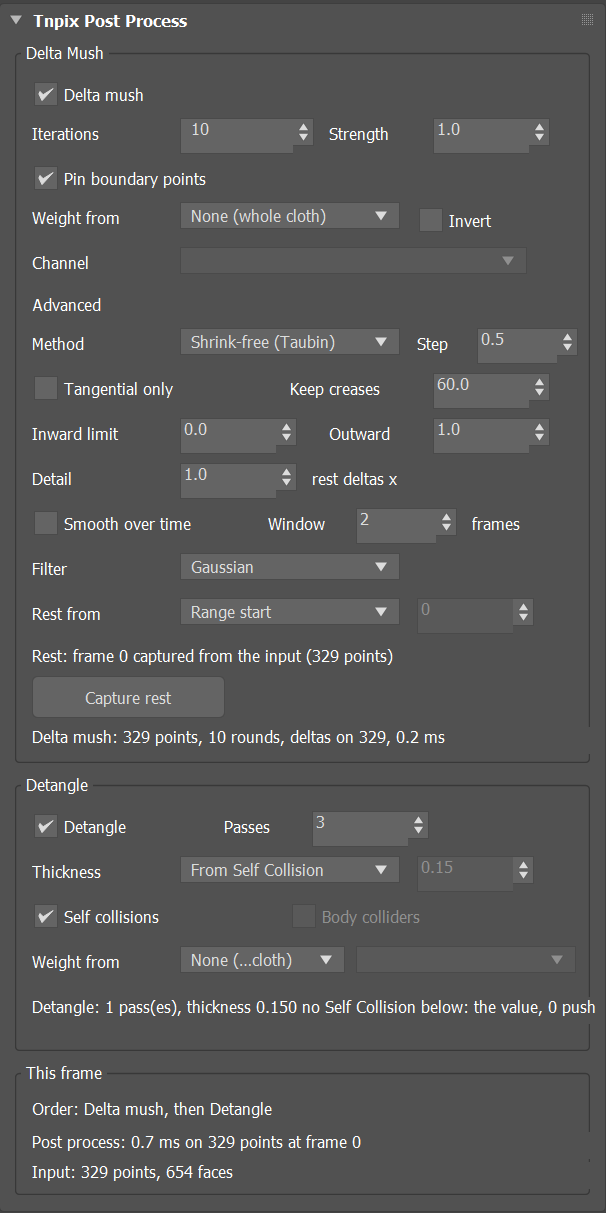
Tnpix Post Process rollout
Delta Mush group
- Delta mush Default on
- Smooths the simulated surface and puts the modelled detail back through the rest deltas.
- Iterations Default 10
- Smoothing rounds per frame. More rounds smooth larger features; the modelled detail comes back through the deltas either way. Range 0 to 500. Animatable.
- Strength Default 1.0
- 0 leaves the simulation as it is, 1 applies the full mush; values in between blend. Animatable.
- Pin boundary points Default on
- Open edges keep the simulated position.
- Weight from Default None (whole cloth) / Invert / Channel
- Where the mush may work: the whole cloth, the vertex colour (red), or a Tnpix channel chosen by name. Invert flips the weight.
Advanced
- Method Default Shrink-free (Taubin)
- Uniform (Max) is 3ds Max's own Delta Mush rule exactly: a plain average every round, with the tangential, crease and limit settings unavailable. Cotangent stops the drift on uneven triangles. Shrink-free (Taubin) keeps the size and the broad shape over any number of rounds.
- Step Default 0.5
- How far each round moves a point towards its neighbours. Range 0.01 to 1. Animatable.
- Tangential only Default off
- Relaxes along the surface only: the spacing evens out while the silhouette and every bump stay, so a pinch along the normal is not cleaned.
- Keep creases Default 60°
- An edge folded sharper than this angle is not smoothed across, so a hem or a pleat stays crisp. The angle is read on the rest pose, once for each rest: the rest and every frame are smoothed by the same rule, so a fold that only appears in the pose is smoothed like any other, and the mesh holds together at any number of iterations. 0 is off. Animatable.
- Inward limit Default 0 / Outward Default 1.0
- How much of the move along the normal into the cloth, and out of it, is allowed. An inward limit of 0 never moves a point towards the body. Animatable.
- Detail Default 1.0
- A multiplier on the rest deltas: 1 puts the modelled detail back exactly, 0 leaves the smoothed base, above 1 exaggerates it. Range 0 to 5. Animatable.
- Smooth over time Default off / Window Default 2 / Filter Default Gaussian
- Averages each point with itself in the neighbouring frames, Window frames on each side. It needs frames on both sides, from a Tnpix Cache file or the Solver's memory below. Gaussian softens over the window; Median removes a single-frame hop without softening the motion.
- Rest from Default Range start / frame / Capture rest
- Where the rest pose is taken: the input at the start of the animation range, or at the frame you type (This frame). Capture rest takes the rest pose now by evaluating the stack at the rest frame; it is needed only when nothing below (a Cache or the Solver) can provide it. The Rest line says where the rest came from. The rest is saved with the scene and read back whatever frame the file opens on, and the Rest line then says read back from the scene file; a rest that came from a Tnpix Cache or the Solver's memory is asked of them again first, and the file's copy is used when they cannot hand it over. A rest taken by Capture rest is kept until Capture rest is pressed again, whatever the timeline does and whatever the rest frame is set to (the Rest line says when the rest frame no longer matches it); the press marks the scene as changed, so 3ds Max asks to save it. A copy of the object keeps the rest of the one it was copied from.
Detangle group
- Detangle Default on
- After the mush: cloth that went through other cloth is brought back to its own side, then points closer than the thickness are pushed apart. No step leaves a new crossing.
- Passes Default 3
- Push-apart rounds per frame, from 1 to 50, after the cloth that went through is brought back. The status line says how many crossings were undone and how many are left, how many pairs were pushed and how many are still close. Animatable.
- Thickness Default From Self Collision
- The separation the detangle restores: the garment's own Self Collision thickness, or This value, typed in scene units (default 0.15).
- Self collisions Default on
- Cloth against itself: what went through is brought back, then layers closer than the thickness are pushed apart.
- Body colliders Default off
- Cloth against the colliders listed in the Tnpix Collision below the Post Process, each at its own row's thickness: points inside a collider, or closer than its thickness, are moved out, before and after the cloth-against-cloth steps. An open collider keeps the side its Open mesh setting gives it. With no Tnpix Collision below, the status line says so.
- Weight from / Channel
- Which points the detangle may move: the whole cloth, the vertex colour, or a Tnpix channel. Weight 0 is held in place.
Where two open edges cross each other, like two hems crossing as scissors do, no closed piece of cloth went through and nothing is moved: the status line counts those crossings as left where two open edges cross.
This frame group
The order of work (Delta mush, then Detangle) and what each did on the current frame.
The rest pose follows the mesh. When the mesh below changes its topology, for example a TurboSmooth added below or a segment count edited, a rest taken from the rest frame is taken again by the same rules, and the Rest line says so. A rest taken by Capture rest is held instead, not applied: the Post smooths without it, as with no rest, the Rest line says so, and the rest applies again when the mesh it was taken on comes back; press Capture rest to take the new mesh's. A tear only adds vertices, so the rest is kept through a tear and the torn edges are smoothed.
The file grows by 12 bytes per point of each object with a Post Process (about 1.2 MB for 100,000 points).
Post Process is a finishing tool, not a fix for a wrong simulation. If the cloth passes through the body, raise the collider's Thickness and the Solver's Substeps first: smoothing a wrong surface gives a smooth wrong surface.