Chapter 3 · Modifier Reference
3.12Tnpix Stitch
The Tnpix Stitch modifier sews cloth to cloth. A Pin holds cloth to an object outside the simulation; a Stitch holds the painted points of one garment to another garment in the same Solver group, or to the garment's own folded-over parts, such as a rolled cuff or a tucked flap. It sews a Tnpix Soft Body the same way: a strap to a soft body, or a fat layer to a muscle, sliding over it if you let it (see the Sliding group).
Location: Modify panel ▸ Modifier List ▸ Tnpix Stitch
Stitches form when the simulation starts: every painted point within the search distance binds to the nearest surface point of a listed garment, and the pair holds for the run. A stitched pair is left alone by self collision, so the two never fight. Chapter 5 walks through a complete seam.
Interface
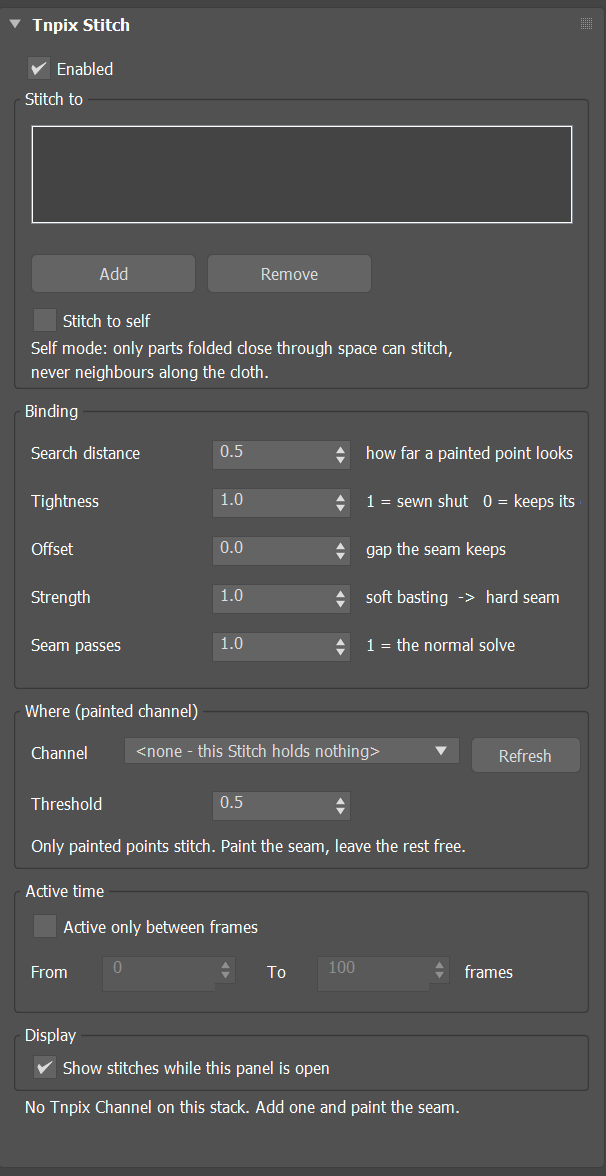
Tnpix Stitch rollout
- Enabled Default on
- Turns this stitch off without removing it.
Stitch to group
- List / Add / Remove
- The garments this cloth stitches to. They must be on the same Solver as this cloth; a garment on another Solver is marked in the list and refused when the simulation starts. Add picks a garment in the viewport (right-click to stop picking); Remove takes the selected garment out of the list without deleting it.
- Stitch to self Default off
- Stitches the cloth to its own folded-over parts. Only parts folded close through space can stitch; neighbours along the cloth never do.
Binding group
- Search distance Default 0.5 in
- How far a painted point looks for a surface to stitch to, in scene units (a new modifier takes 0.5 inch in the scene's unit). A starting point: tune it per scene. At 0 nothing is found, and the panel says so.
- Tightness Default 1.0
- 1.0 pulls the pair together like a sewn seam, and the seam stays shut, also where three panels meet: the Solver's smoothing leaves every stitched point where the seam put it. 0 is a rigid tack: the pair keeps its starting gap exactly. Values in between close the gap proportionally.
- Offset Default 0
- A gap the seam keeps between the two cloths, in scene units, added to what Tightness leaves: at Tightness 1 the pair holds exactly this far apart. This cloth keeps the gap; the cloth it is stitched to is never pushed away by it.
- Strength Default 1.0
- How rigid the hold is, from soft basting at 0 to a hard seam at 1: around 0.5 the seam holds, from about 0.8 it is sewn shut.
- Seam passes Default 1
- How many solver passes the seam gets each step, from 1 to 10. 1 is the normal solve; raise it if a sewn seam sags while the cloth is falling.
Sliding group
- Slide along the surface Default off
- The stitched points stay on the surface they are sewn to, at the stitch's gap, but can slide along it: a fat layer over a muscle, a skin over the fat. Off, every point is sewn in place.
- Friction Default 0.3
- How hard the sliding is: 0 slides freely, 1 does not slide, as a plain stitch. Range 0 to 1. Unavailable while Slide along the surface is off, on the panel and in the TenPix Graph.
Where (painted channel) group
- Channel / Refresh
- The painted channel that says where stitching is allowed. Only painted points stitch: paint the seam and leave the rest free.
- Threshold Default 0.5
- Painted points at or above this weight stitch; below it they stay free. It trims the edge of the painted area.
Active time group
- Active only between frames Default off
- Limits the stitch to a frame range. On, before From and after To the painted points are free cloth: at From the stitch finds its pairs where the cloths are and starts to pull, and after To it lets go and the points keep the motion the seam gave them.
- From Default 0 / To Default 100
- The first and last frames the stitch holds. If To is before From, the stitch never activates.
Active Zone group
Lets a stitch pull only where a zone reaches its seam, the point halfway between its two ends. The stitches are found as before, by the painted channel and the search distance; the zone decides which of them pull. A stitch the zone reaches starts to pull from where the cloths are. The zone works inside the Active time above.
- Active Zone Default off
- A stitch pulls only while the zone reaches its seam, with its Strength times the zone's value there: the full Strength inside a helper's Near radius, fading to nothing at its Far radius. Off: every stitch pulls.
- Invert Default off
- Turns the zone round: every stitch pulls except where the zone reaches its seam - nothing inside Near, fading in to the full Strength at Far. With no helper picked, every stitch pulls.
- List / Pick / Remove
- The Influence Helpers that make the zone, as on Tnpix Forces.
- Stays sewn once touched Default on
- On: a stitch the zone has reached keeps pulling after the zone moves on - sweep the helper along the seam and it closes behind it like a zipper. Off: only the stitches inside the zone pull, and the seam lets go again behind it. With Invert on, the box reads Stays open once touched: a stitch the helper has touched lets go for good - sweep the helper along a sewn seam and it opens behind it.
- Status line
- After a simulation: on the last simulated frame, how many stitches are pulling.
Display group
- Show stitches while this panel is open Default on
- Draws one line per stitch while the panel is open. Nothing is drawn until the simulation has been built.
- Status line
- Says what will happen before you play, for example 22 painted points are stitched to 1 garment(s), or that no painted point is within the search distance of a surface, or that there is nothing to stitch to yet, with what to do about it.