Chapter 3 · Modifier Reference
3.14Tnpix Volume
The Tnpix Volume modifier gives a closed shell an inside. Without it a closed mesh is still just a surface and collapses like cloth; with it the enclosed volume is kept, so a ball stays a ball, a sleeve keeps its round and an inflatable inflates. On a whole object it needs a closed mesh; on a painted region of a body (a belly, a cheek, the top of a cushion) it holds the volume of that region alone, measured against a centre.
Location: Modify panel ▸ Modifier List ▸ Tnpix Volume
Volume is per object: on a shared Solver each garment follows the target of its own Volume modifier, and an object without one has no volume, even when it is stitched to a garment that has one. Several regions are several Tnpix Volume modifiers on one object, each with its own channel, centre and settings; a point painted in two channels belongs to both.
Interface
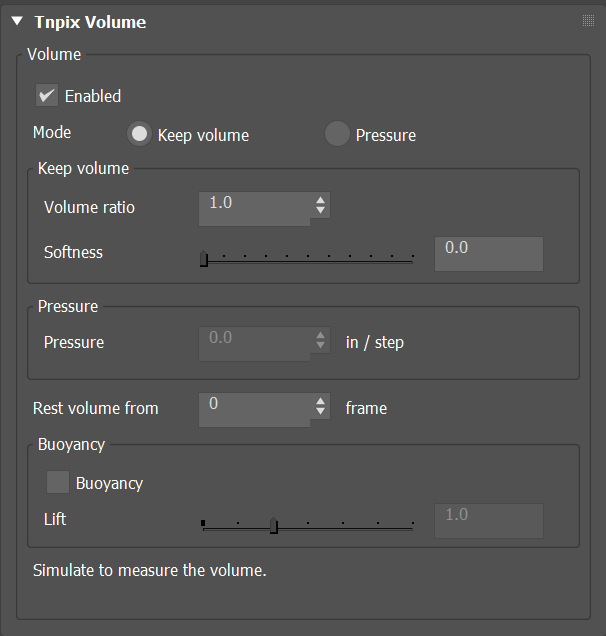
Tnpix Volume rollout
Volume group
- Enabled Default on
- Turns the volume off without removing the modifier.
- Mode Default Keep volume
- Keep volume holds the air inside at Volume ratio times the rest volume, every frame. Pressure pushes the shell outward with a constant pressure instead, and the fabric decides where it settles (see How a Volume reaches its size).
Region group
- Channel / Refresh Default <none - the whole object>
- The painted channel this Volume holds. <none - the whole object> holds the whole closed shell. A channel makes this Volume hold only the painted area, and the paint says how firmly each point keeps the volume: painted 1 keeps it fully, 0 is free, so a soft-edged region blends into the rest of the cloth with no crease at its border. The region does not have to be closed. Refresh reads the channel list from the stack again.
- Centre Default Its own middle
- A painted patch is open, so its volume is measured against a centre: everything between the painted skin and that point. Its own middle is the middle of the painted points, carried with them; there is nothing to pick, but a nearly flat region holds little against it. Object with Pick uses an object inside the region, such as a bone or a helper that follows the animation: the region keeps its volume around it and is carried with it. The cloth itself cannot be its own centre.
Keep volume group
- Volume ratio Default 1.0
- The target as a fraction of the rest volume: 1.0 holds the rest volume, 1.3 inflates by 30 percent, 0.8 lets 20 percent of the air out. Range 0.05 to 10. Animatable.
- Softness Default 0
- 0 holds the volume exactly every frame. Higher values let contact squash the shape, which then recovers over time: the higher the value, the more it gives and the slower it comes back. Range 0 to 1.
Pressure group
- Pressure Default 0
- A constant push outward, in scene units per solver step; negative values pull inward. Keep it under a quarter of the mesh's edge length. Range −10 to 10. Used in Pressure mode. Animatable.
- Rest volume from (check box) Default on
- On, the shell keeps the volume it had at the frame beside it, times the Volume ratio. Off, there is no rest frame: the shell's volume follows the shape below the Solver on every frame, times the Volume ratio, so a body that grows or shrinks during the shot takes the shell with it. The shape below is read through a Tnpix Wrap below the Solver, on a cloth with a Solver of its own; TenPix modifiers that move nothing below the Solver, such as a Tnpix Soft Body or a Tnpix Preserve, may sit there too. Where the shell cannot follow, it keeps its first frame's volume and the status line says why. Keep volume mode only. The frame is unavailable while the box is off, on the panel and in the TenPix Graph.
- Rest volume from (frame) Default frame 0
- The frame whose shape counts as the rest volume. 0 means the first simulated frame, wherever the timeline starts: on a timeline from −10 the volume is held from frame −10. Any other number is that frame: until then the Volume leaves the shape alone.
Buoyancy group
- Buoyancy Default off
- Lifts the closed shape as if it were lighter than the air around it. Buoyancy and Lift belong to a whole object and are not used while a Channel is set. Animatable.
- Lift Default 1.0
- 1.0 makes the shape hover, weightless. Below 1 it still falls, more slowly; above 1 it rises; 2.0 rises as hard as it would fall. Range 0 to 3. Animatable.
- Status line
- Reports what the modifier is doing on this object. For a region: its channel, its centre and how many points it holds, then its volume on the last simulated frame against its rest.
How a Volume reaches its size
A Volume pushes like the air in a balloon: the shell inflates until its fabric holds it. A fabric can stretch only so far, and a Volume that asks for more holds the fabric at its stretch limit: the default fabric, which stretches at most 5 percent, encloses about 1.15 times its volume there. For a shell that inflates further, give it a fabric that stretches further. A keyed Volume ratio or Pressure inflates and deflates the shell with the keys.
On a body that nothing pins, free or resting on the ground, a region changes shape without pushing the body away. On a pinned body the pins take the region's push. A region measured against a picked object moves with that object: a bone carries its region.
A region placed above a Tnpix Pin or a Tnpix Preserve on the stack lets go of the points it paints: they keep the region's volume while the rest of the pinned body stays held. Placed below the Pin, the region works on the points the Pin leaves free. A ball hung by a Pin on its pole, with a region over its top half that covers the pole, drops when the Volume is above the Pin: put the Pin above the Volume, or paint the region off the pinned points, to keep it hanging.
Keyed values drive one continuous simulation: animate Volume ratio or Pressure to inflate or deflate a shape during the shot. Keys are read on their own frame on any timeline, in any scene unit.