Chapter 3 · Modifier Reference
3.17Tnpix Cache
The Tnpix Cache modifier saves the finished simulation to a file and plays it back. Once a shot is approved, the cache is what you render from: the cloth is read from disk instead of simulated, so it is fast, identical every time and unaffected by changes further down the stack. The cache can also be retimed and posterized.
Location: Modify panel ▸ Modifier List ▸ Tnpix Cache (above the Solver)
To save a simulation and play it from the cache:
- Add Tnpix Cache above the Tnpix Solver.
- Click ... and choose a file name. Choose Tnpix cache (*.tnc) for TenPix's own format or Alembic (*.abc) for use in another application.
- Leave Specific range off to save the whole animation range, or turn it on and set Start and End.
- Click Save cache. The recording starts at the first frame of the range wherever the time slider is. Frames already simulated are saved as they are; missing frames are simulated first.
- Make sure Play from cache is on. The cloth now plays from the file.
Interface
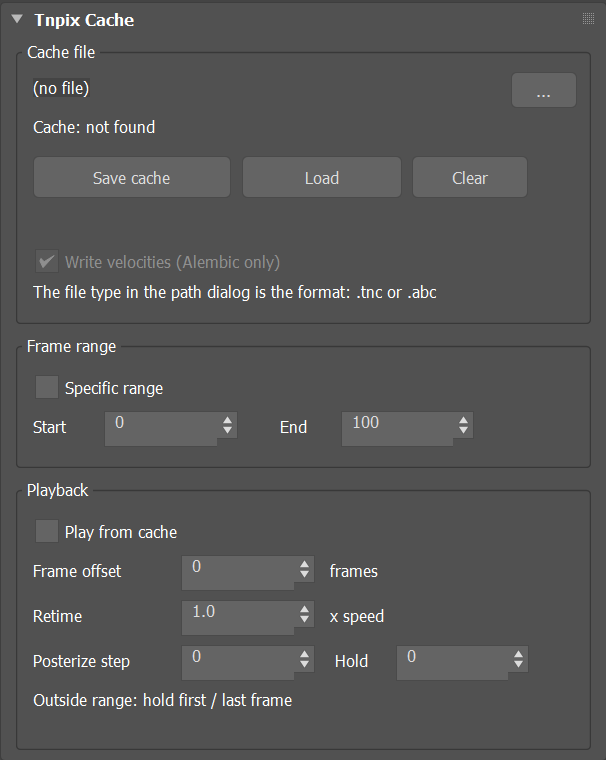
Tnpix Cache rollout
Cache file group
- Path / ...
- The file this garment plays from and saves to. The file type you choose in the file dialog, .tnc or .abc, is the format Save cache writes. The line below says whether the file was found. Each garment's file is listed in File ▸ Reference ▸ Asset Tracking, in the Resource Collector and in a farm's asset gathering (Scene_<garment>.tnc when one Cache serves several garments). Set Path in Asset Tracking moves the Cache to the folder given, and every garment's file is read from there; a bare or relative name is found the way 3ds Max finds any input file. A Cache that does not play is never reported as a missing file.
- Save cache
- Writes the frame range to the file, from its first frame, wherever the time slider is; the slider is put back afterwards. Frames already simulated are saved as they are; missing frames are simulated first. If the simulation in memory began on another frame, the Save starts the simulation again from the first frame. A progress bar shows the frames recorded; Esc or Cancel stops it, and the frames written so far are kept. Playing the timeline never records. In the demo, Save cache writes .tnc only.
- Load
- Opens the cache file and starts playing from it. A .tnc file whose recording was cut short, for example a farm task that was stopped, plays every frame it finished, and the status says that the recording stopped early and which frames were kept.
- Clear
- Stops using the file. Nothing is deleted from disk.
- Write velocities (Alembic only) Default on
- Adds per-point velocities to an Alembic file, so a renderer can compute motion blur from a single sample.
Frame range group
- Specific range Default off
- Off, the scene's whole animation range is saved. On, only the frames from Start to End.
- Start Default 0 / End Default 100
- The first and last frames to save when Specific range is on.
Playback group
- Play from cache Default off
- Serves the mesh from the file. While it is on, the Solver below is not evaluated and its stored frames are released. A successful save turns it on.
- Frame offset Default 0
- Shifts the cached frames on the timeline, in frames, for example to reuse a recorded action later in the shot.
- Retime Default 1.0
- Playback speed: 1.0 plays as cached, 0.5 at half speed, 2.0 at double speed. Between cached frames the pose is interpolated. Animatable: key it for a speed ramp or a freeze (0). Every moment plays at the speed keyed there, so a key never makes the cloth jump. Range 0 to 1000.
- Posterize step Default 0
- Every this many frames the pose is stamped and held: the stepped look of animation on twos or threes, without simulating again. 0 is off. Animatable.
- Hold Default 0
- How many frames each stamped pose is held; the rest of the step plays as animated. Hold equal to Step is fully stepped. Animatable.
Outside the recorded range the cache holds its first or last frame.
Rendering from the cache
- Motion blur. Turn on the renderer's motion blur; the Tnpix Cache serves the times between frames. Where the vertex count changes between two frames, as on a torn cloth or on the tubes of a threads object, the two frames are matched point by point, so the cloth and the threads blur across the cut too. Write velocities adds velocities to an Alembic file for renderers that blur from a single sample.
- Saving on a render farm. The garments of a shared Solver take their places in the Solver group, and so their default self-collision layers, in the order 3ds Max first evaluates them; on your workstation the viewport does that. On a farm machine, where nothing has drawn the scene, a Save that finds its Solver group not yet formed first evaluates the scene once at its first frame, as a viewport would, so the Solver group is formed as on your workstation.
- Farm progress. With the Deadline scripts, every frame a Save records is shown as the task's progress in the Deadline Monitor. See Rendering on a Farm in Chapter 5.
The Cache Manager on the TenPix toolbar loads, saves and clears the caches of many garments at once. A garment on a shared Solver is saved together with its whole Solver group. See Chapter 4.