Chapter 3 · Modifier Reference
3.1Tnpix Solver
The Tnpix Solver modifier runs the simulation. Every object that carries the same instance of the modifier is simulated together, as one Solver group. The Solver sets the quality of the solve, the collision system and the viewport diagnostics; the fabric itself is described by the material modifiers.
Location: Select the cloth object ▸ Modify panel ▸ Modifier List ▸ Tnpix Solver
Interface
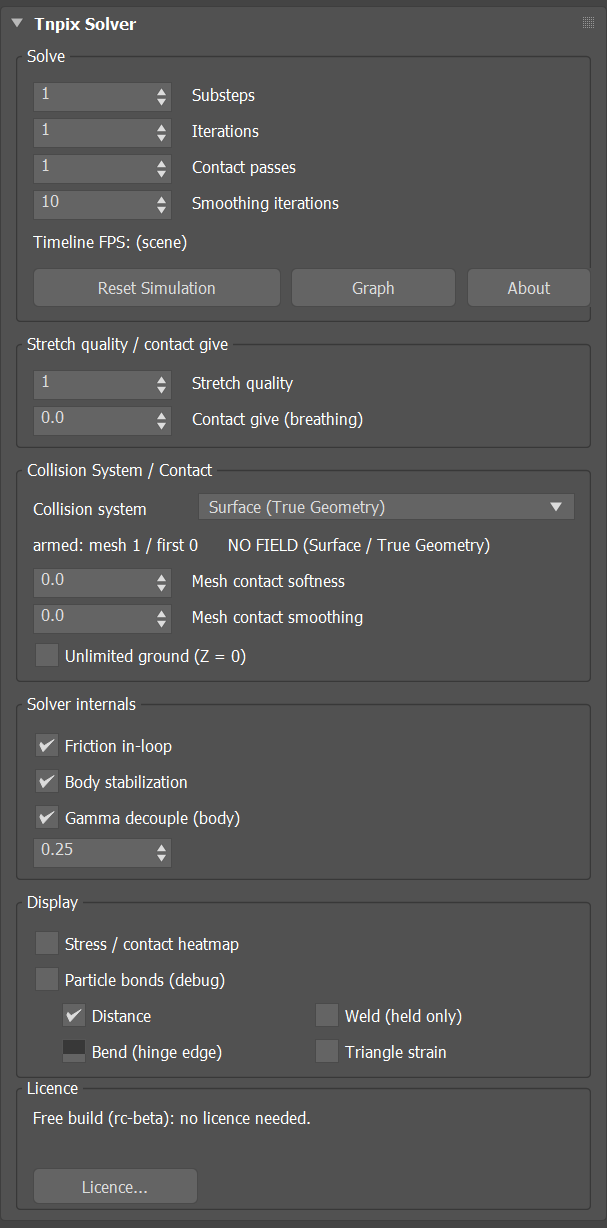
Tnpix Solver rollout
Solve group
- Substeps Default 4
- The main quality control: how finely each frame is solved. Higher values give more accurate motion and collision and cost proportionally more time. There is no upper limit. The TenPix Graph and MAXScript use the same number. See Simulation Quality in Chapter 2.
- Iterations Default 2
- How many times the constraints are solved inside each substep.
- Contact passes Default 1
- How many times contacts are resolved per step, from 1 to 16. Raise it when cloth is pushed through a collider under sustained pressure, and raise it together with Iterations and Stretch quality.
- Smoothing iterations Default 10
- Smooths the cloth surface once per substep, after the constraints are solved. On a dense mesh the solve can print a fine woven zigzag into the surface; this averages it away without adding or removing motion. 0 turns it off; 2 removes most of the zigzag. Range 0 to 16.
- Timeline FPS
- The frame rate the solver reads from the scene, shown so you can confirm that the solver agrees with your timeline.
- Reset Simulation
- Clears the stored frames. The next evaluation simulates again from the first frame. Use it after any change that should invalidate what you have already seen.
- Graph
- Opens the TenPix Graph: every Solver group of the scene with its objects and modifiers, and every TenPix setting editable there. See The TenPix Graph in Chapter 2.
- About
- Opens the About window: the version, the build number, the third-party notices and the licence window.
Stretch quality / contact give group
- Stretch quality Default 2
- Extra passes for the stretch constraints only (the edge net and the membrane), per substep, from 1 to 32. Raise it when a material's stretch status line says the stretch is still converging.
- Contact give (breathing) Default 0
- A small slide, in scene units, that contact allows before friction grips. It lets a fitted garment move on the body instead of being held in place by friction. It acts in the contact stage and is not a stretch control. Range 0 to 100.
Collision System / Contact group
- Collision system Default Surface (True Geometry)
- Chooses how the cloth
collides with the objects in its Collision list. Hover over the list for a description of each option.
Option Behaviour Volume Only The cloth is pushed out of a voxel distance field built around each collider. Features smaller than a voxel are invisible to it. The cheapest and least accurate option. Volume + Proxy The voxel field plus a point-to-triangle pass that catches what the field misses. Surface + Volume The collider's surface has the final say, with the volume field in support. Penetration is equal to or lower than Volume + Proxy, at about 1.8 times the contact cost. It does not reduce jitter. Surface (True Geometry) Contact uses the collider's actual triangles; no voxel field is built, so it works at any scale and on small features. The deep-penetration recovery of the three volume options is not part of it, so start the cloth clear of the body. - Mesh contact softness Default 0
- How forgiving contact with a body is, from 0 to 1. 0 is hard contact; higher values let the cloth press in slightly, which can hide small pokes on dense meshes.
- Mesh contact smoothing Default 0
- Blends contact across neighbouring points so that a body's facets do not print through the cloth, from 0 to 1. Raise it when you can see the collider's polygons in the drape.
- Unlimited ground (Z = 0) Default off
- An endless floor at Z = 0, the plane of the home grid: the cloth lands on it anywhere and cannot fall through it, with no ground object and no collider. It holds the cloth 0.1 inch above the floor, in the scene's unit, as a new collider row does, and grips it with a new row's friction (0.35). It applies to every garment of the Solver group, and Tnpix Threads land on it too.
Solver internals group
- Friction in-loop Default on
- Applies friction while the cloth is being solved rather than afterwards. Steadier for sliding contact; off is slightly faster.
- Body stabilization Default on
- Damps the jolt when a body starts moving under the cloth. Leave it on unless the cloth should react instantly.
- Gamma decouple (body) Default on
- Keeps a body's push, which moves the cloth out of the body, from being treated as fabric motion, so cloth resting on a collider is not damped as if it were stretching.
- Body strain comp Default 0.25
- Lets the fabric give a little exactly where it presses against a body, so contact does not fight the stretch limit. Mesh contact only. Range 0 to 10.
Display group
- Stress / contact heatmap Default off
- Colours the cloth by how hard it is stretched or pressed, on every garment of the Solver group. Diagnostic only; it changes nothing in the solve.
- Particle bonds (debug) Default off
- Draws the internal connections between cloth points. The check boxes below choose which kinds, all off by default: Distance, Weld (held only) for the welds still holding on that frame, Bend (hinge edge) and Triangle strain. The bonds are drawn in the viewport on every garment of the Solver group, whichever object is selected, on frames that have been simulated. Diagnostic only.
Licence group
- Status line
- The licence state of this computer, or in the demo, what the demo simulates and which garment, if any, is too large for it. In the demo build it begins with Demo build.
- Licence...
- Opens the licence window, where you activate this computer with your key, check the licence or deactivate it. In the demo build it shows a note instead: the demo build takes no key. See Licensing in Chapter 1.
The fabric's stretch limit is set on the material, not on the Solver: see max strain on Tnpix Material Standard and the Stretch rollout of Tnpix Material Advanced.