Chapter 3 · Modifier Reference
3.7Tnpix Material Standard
The Tnpix Material Standard modifier describes the fabric with the everyday dials and twelve stock fabrics. Start here, and move to Tnpix Material Advanced when a particular fabric needs the full model. A stack can carry several Standard materials, each bound to a painted channel, so one garment can be several fabrics.
Location: Modify panel ▸ Modifier List ▸ Tnpix Material Standard
The modifier has three rollouts: Presets (your own saved presets), Material Parameters and Advanced Parameters.
Interface
Presets rollout
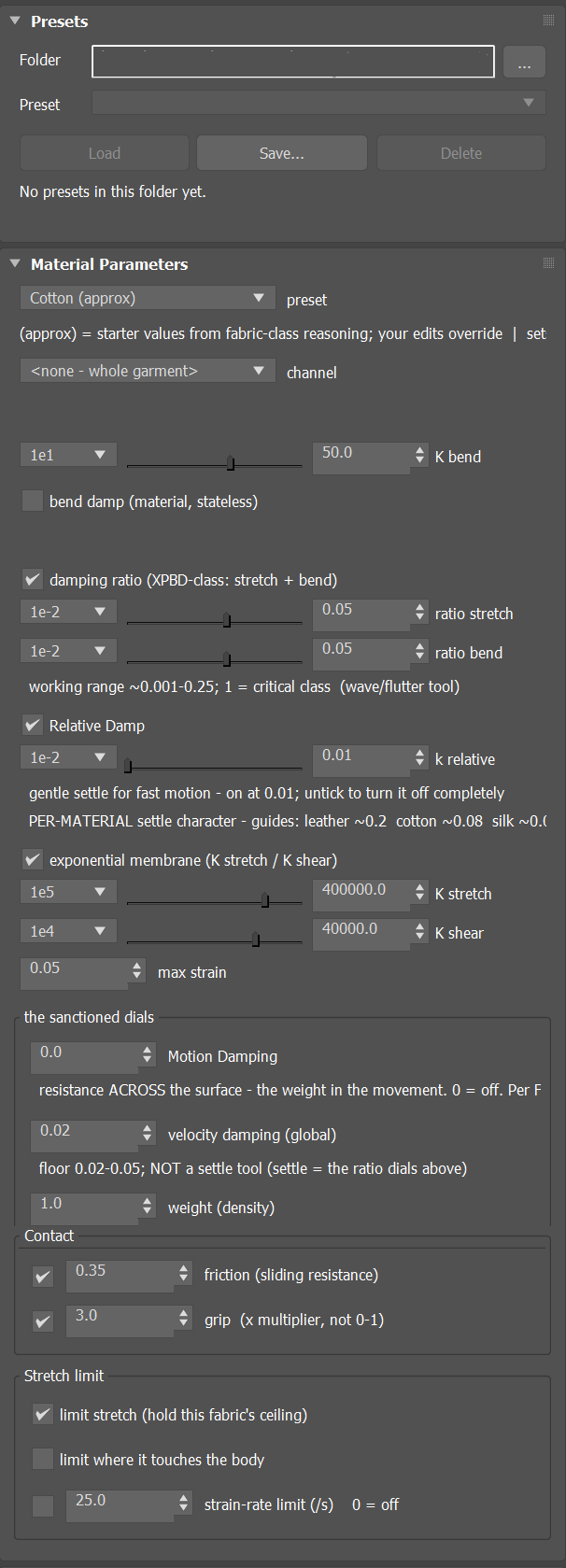
Saves every dial of the material to a preset file and loads it back, on this material or any other of the same kind. The rollout is the same on Tnpix Material Advanced.
- Folder / ...
- The folder where presets are saved and read. One folder serves both materials and is
remembered on this computer. The first time, it is
Documents\TenPix Cloth\Material Presets. - Preset
- The presets in that folder that belong to this kind of material (Standard presets on a Standard material, Advanced presets on an Advanced material).
- Load
- Puts every dial and every check box back exactly as saved. A preset is a complete description: every value the preset does not mention returns to its default. Ctrl+Z undoes the load.
- Save...
- Saves every dial, its value and whether it is ticked, under a name you type. The name becomes the file name in the folder.
- Delete
- Deletes the chosen preset. The file goes to the Windows Recycle Bin.
A preset stores the fabric, not its place on the garment: the channel binding is not saved and is
not changed by Load. Standard presets are .tpstd files; Advanced presets are .tpadv
files.
Material Parameters rollout
- preset
- Applies one of twelve stock fabrics: Cotton (approx), Silk (approx), Denim (approx), Leather (approx), Wool, Linen, Chiffon (approx), Satin, Spandex, Polyester, Canvas and Velvet. A stock fabric writes only the values it carries; every other dial keeps your number, so a stock fabric layers onto your work instead of replacing it. Fabrics marked (approx) are starter values: adjust them to your shot.
- channel Default <none - whole garment>
- Binds this material to a painted channel, so that it covers only the region painted in that channel. Left at none, the material covers the whole garment; that is a real choice, not a placeholder.
- K bend Default 50
- How strongly the fabric resists folding. Acts on this material's own region: two materials give two bend behaviours. Like the other large-range dials of this panel it has three controls: the list snaps the value to a power of ten, the slider moves across the whole range (10−10 to 1010) on a logarithmic scale, and the field sets an exact value.
- bend damp (material, stateless) Default off
- Tick to damp folds; the damp bend dial appears, starting at 0.01. It sets how quickly a fold settles once it forms. Clearing the tick turns bend damping off.
- damping ratio (XPBD-class: stretch + bend) Default on, 0.05 / 0.05
- How quickly an oscillation settles, as a fraction of critical damping, for stretch (ratio stretch) and bend (ratio bend). The working range is about 0.001 to 0.25; 1 is critical damping. Applies to the whole garment. Ticking the box arms both ratios at 0.01; clearing it turns them off.
- Relative Damp Default on, 0.01
- Damps each point's movement relative to its whole cloth piece, rather than against the world (k relative). It takes the shimmer out of a jittery surface without deadening the garment's overall motion. Guide values: leather about 0.2, cotton about 0.08, silk about 0.02. Applies to the whole garment. Clearing the tick turns it off completely.
- exponential membrane (K stretch / K shear) Default on, 400,000 / 40,000
- The membrane model: K stretch is the stiffness along and across the weave, and K shear how hard the fabric resists being pushed out of square. Clearing the tick turns the membrane off; ticking it again arms 400,000 and 40,000. Both act on this material's region; regions no channel covers use the whole-garment value.
- max strain Default 0.05
- The stretch ceiling of this fabric, as a fraction of the rest length: 0.05 lets an edge stretch 5 percent. Acts on this material's region.
"the sanctioned dials" group
- Motion Damping Default 0
- Resistance across the surface: the weight in the movement, per frame. Raise it to settle a jittery garment; too high looks syrupy. 0 is off. Acts on this material's region.
- velocity damping (global) Default 0.02
- Velocity damping for this fabric. Keep it at a small floor, about 0.02 to 0.05; it is not the tool to settle motion (use the damping ratios). Acts on this material's region.
- weight (density) Default 1.0
- Fabric mass per unit area. It drives how the garment hangs under gravity. Acts on this material's region.
Contact group
- friction (sliding resistance) Default on, 0.35
- How much this fabric grips a collider. Ticked, this fabric's value counts; clearing the tick keeps your number, so ticking again brings it back. A ticked friction takes over from a collider row's own value unless that row's Override material is set.
- grip (x multiplier, not 0-1) Default on, 3.0
- An extra holding force for this fabric against a collider. It multiplies: the hold against a body is grip × friction, so 0.3 is a large reduction, not a small one. The tick behaves like the friction tick.
A new material starts with the membrane, friction and grip ticked. These are the defaults of a material you add; a saved scene opens with the values it was saved with. Because friction and grip are ticked, a new material's 0.35 and 3.0 are used on the colliders it touches in place of a collider row's own friction and grip; they are the numbers a new collider row has too. To make a row's own values count, set Override material on that row.
Stretch limit group
- limit stretch (hold this fabric's ceiling)
- On, this fabric holds its own stretch ceiling, the max strain value above. Off, it follows the Solver's own stretch limit.
- limit where it touches the body Default off
- Off, an edge whose two ends both touch the body is free of the ceiling, so a fitted garment stays as modelled. On, the ceiling holds there too; use it where a dense garment shows small pits on the body.
- strain-rate limit (/s) Default off, 25
- Caps how fast a taut edge may lengthen, in rest lengths per second; only impacts reach 25. 0 turns it off for this fabric. Unticked, the fabric follows the Solver's own strain-rate limit and your number is kept.
Advanced Parameters rollout
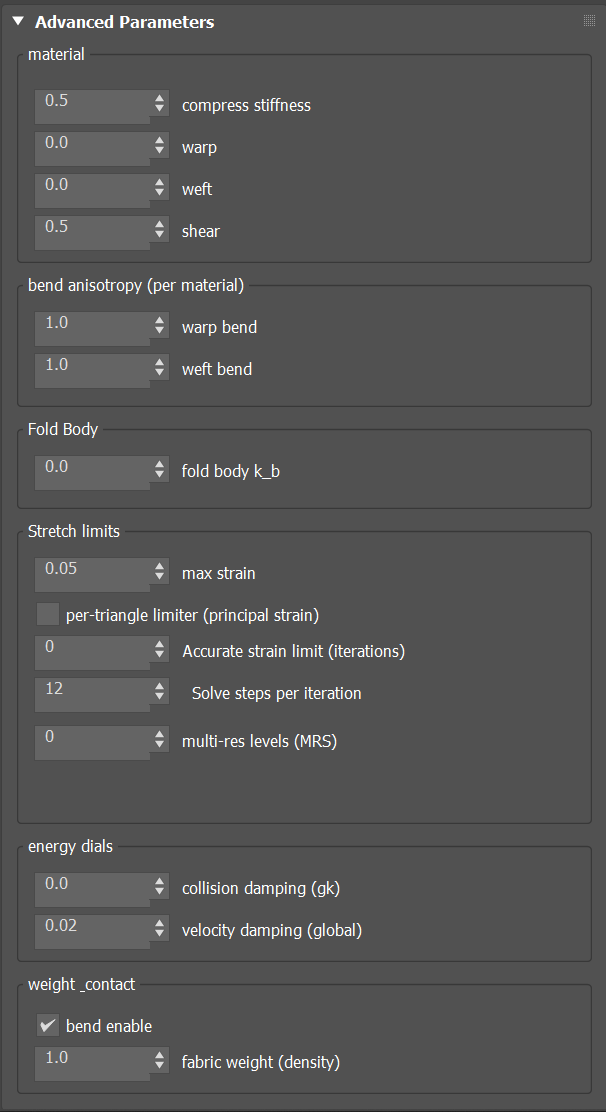
material group
- compress stiffness Default 0.5
- How hard the fabric resists being squashed along its own surface, as opposed to being stretched. Low values let it buckle into wrinkles naturally.
- warp / weft Default 0 / 0
- Directional stiffness along the warp and across the weft. Equal warp and weft give cloth that behaves the same in every direction.
- shear Default 0.5
- How hard the fabric resists being pushed out of square.
bend anisotropy (per material) group
- warp bend / weft bend Default 1.0 / 1.0
- Let the fabric fold more easily in one direction than the other, as a real weave does. Equal values favour no direction.
Fold Body group
- fold body k_b Default 0, range 0 to 100
- Bend stiffness of the fabric's own fold term, applied per region by the paint. Low values fold loosely and crumple; higher values hold broader, rounder folds. 0 turns it off. Above about 100 the fold term no longer changes the cloth visibly, so the field stops there.
Stretch limits group
- max strain
- The same stretch ceiling as on the Material Parameters rollout.
- per-triangle limiter (principal strain) Default off
- Limits stretch across the whole triangle rather than only along its edges.
- Accurate strain limit (iterations) Default 0
- Extra passes of the accurate stretch limit. It holds the fabric's length more tightly than the ordinary limit, most noticeably on dense cloth, and costs more time. 0 turns it off.
- Solve steps per iteration Default 12
- Solver steps inside each accurate stretch pass. Raise it if the fabric still creeps longer than asked; it costs time rather than changing the look.
- multi-res levels (MRS) Default 0
- Multi-resolution levels for this fabric: the setting that makes high-resolution cloth behave. On a dense shirt it more than halves the stretch left in the cloth at the same cost. 0 turns it off.
energy dials group
- collision damping (gk) Default 0
- A global stiffness scale for this fabric.
- velocity damping (global)
- The same velocity damping as on the Material Parameters rollout.
weight & contact group
- bend enable Default on
- Clear it to turn bending off over this material's region.
- fabric weight (density)
- The same fabric weight as on the Material Parameters rollout.
Which values act per region
When a garment carries several Standard materials, each bound to its own channel, these values act on each material's own region: weight, velocity damping, Motion Damping, max strain, K bend, K stretch and K shear. Relative Damp and the damping ratios act on the whole garment. Regions that no channel covers use the whole-garment values.
If a stock fabric feels too stiff and lifeless, check compress stiffness: cloth has to buckle to wrinkle, and a fabric that resists compression as hard as tension cannot fold.