Chapter 3 · Modifier Reference
3.10Tnpix Pin
The Tnpix Pin modifier holds part of the cloth in place or makes it follow an object: a collar on a neck, a waistband on a hip, a flag's edge on its pole. The pinned region is a painted channel, so the pin survives edits to the mesh. A stack can carry several Pin modifiers, each with its own channel and object.
Location: Modify panel ▸ Modifier List ▸ Tnpix Pin
To pin a region to an animated object:
- Paint the region in a Tnpix Channel, for example a channel named waist.
- Add Tnpix Pin and choose waist in Channel.
- Click Select Object and click the object the region should follow.
- Play. The painted points follow the object, including its animation; the rest of the cloth hangs from them.
Interface
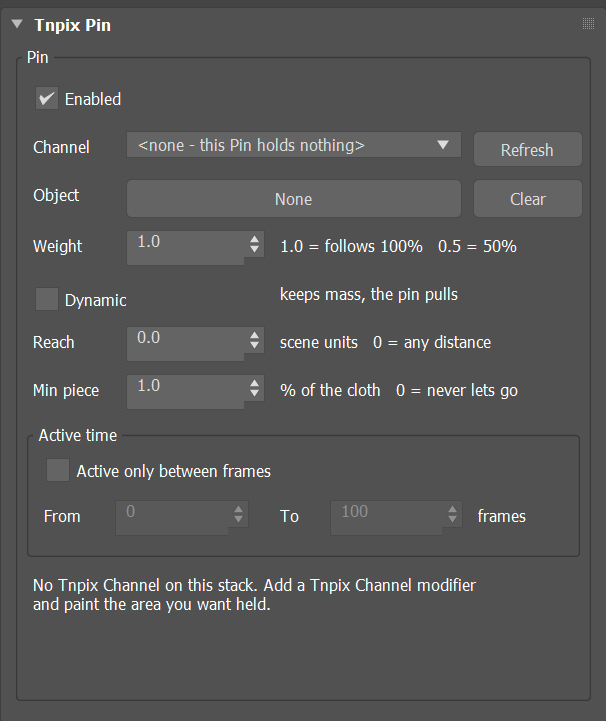
Tnpix Pin rollout
Pin group
- Enabled Default on
- Turns this pin off without removing it.
- Channel / Refresh
- The painted channel that defines the pinned region. <none> means this pin holds nothing. Refresh reads the channel list from the stack again.
- Object: Select Object / Clear
- The object the pinned region follows. Clear unbinds it; the region then holds in place.
- Weight Default 1.0
- How much of the object's motion the pinned region follows, from 0 to 1; each point's share is its painted value times this Weight. At 1.0 the region follows 100 percent. Below 1 the pin is soft and the Weight is the share it follows: 0.5 follows half of the object's motion and sags behind it, 0.75 three quarters, the same on a coarse or a fine garment and on a garment that shares its Solver. Each point is drawn toward the object by a damped spring, so it follows smoothly and does not swing past it, while the cloth, a Tnpix Volume and collisions still act on it. Animatable.
- Dynamic Default off
- On, the pinned points keep their mass and the pin pulls them to the object, so gravity, damping and collision keep acting on them, and a point that is let go keeps its own velocity; the pull is damped as a soft pin's is. Off, the object moves the points directly, which is exact and cheap: use it for cloth pinned to a body.
- Reach Default 0
- How far from the object a painted point may be when the pin takes hold, in scene units. Farther points are left as free cloth. 0 means any distance. Use it when the cloth has torn or fallen away before the pin starts, so the pin does not pull back pieces that are no longer at the object.
- Min piece Default 1.0
- A torn piece smaller than this share of the cloth, in percent of its faces, lets go of the pin, keeps the motion the pin gave it and falls. The main piece never lets go. 0 means every pinned piece stays pinned.
Active time group
- Active only between frames Default off
- Limits the pin to a frame range. Off, the pin holds for the whole animation. On, before From and after To the painted points are free cloth: at From the pin takes them where they are, and after To it lets go and they keep the motion the pin gave them.
- From Default 0 / To Default 100
- The first and last frames the pin holds, counted as the timeline counts frames. Because the pin takes the points where they are at From, there is no jump. If To is before From, the pin never activates.
- Status line
- What the pin is bound to and what it holds.
Active Zone group
Lets the pin hold a painted point only where a zone reaches it. A point the zone reaches is taken where it is, with no jump, as at the Active time's From frame; a point the zone leaves is let go and keeps the motion the pin gave it, as after To. The zone works inside the Active time above: with Active only between frames on, it works only from From to To.
- Active Zone Default off
- The pin holds a painted point only while the zone reaches it, with its Weight times the zone's value there: the full Weight inside a helper's Near radius, fading to nothing at its Far radius. A point the zone reaches again is taken again where it is, unless it is then farther than Reach from the object. Off: the pin holds every painted point.
- Invert Default off
- Turns the zone round: the pin holds every painted point except where the zone reaches - nothing inside Near, fading in to the full Weight at Far. A point the turned-round zone reaches is taken where it is. With no helper picked, the pin holds every painted point.
- List / Pick / Remove
- The Influence Helpers that make the zone, as on Tnpix Forces.
- Stays held once touched Default off
- Off: the zone is a window - the pin holds only the points inside it now. On: the zone is a brush - every point it has reached stays held until the Active time ends. With Invert on, the box reads Stays free once touched: it still remembers what the helper touched, and a point the helper has touched stays let go - the helper is an eraser.
- Status line
- After a simulation: on the last simulated frame, how many of the painted points the zone holds.
Paint at full weight, with Weight 1, for a hard pin. Below that the pin follows its share: painted 1 with Weight 0.5, or painted 0.5 with Weight 1, follows half of the object's motion. For a region that should hold almost firm, use a Weight near 1: 0.9 follows about 93 percent of the motion, 0.95 about 98 percent and 0.99 nearly all of it.
To make a region follow the character's own animation — a Skin, a Skin Wrap or any deformer below the Solver — rather than another object, use Tnpix Preserve (below). The Pin binds each painted point once, at the first frame, to the nearest triangle of the object it follows, so with an arm close to the body at that frame a sleeve's armpit binds to the body; a Preserve searches for nothing.
A Tnpix Soft Body or a Tnpix Volume with a Channel placed above this Pin on the stack lets go of the points its channel paints, as far as it paints them: they move with the flesh or the Volume while the rest of the pin holds. Placed below the Pin, it lets nothing go: the Pin holds them. On a Solver shared by several objects each object's paint lets go of its own points only.
Keep pinned points out of colliders. A pinned point inside a body is held there by the pin and pushed out by the collision on every step, which shows as jitter near the pinned region, most visibly in slow motion.