Chapter 3 · Modifier Reference
3.2Tnpix Garment
The Tnpix Garment modifier rebuilds the incoming mesh into cloth the solver can work with: an even triangle mesh at the edge length you choose, or a new surface re-made from a volume. It changes the vertex count, so it goes at the bottom of the stack, below every other Tnpix modifier.
Location: Modify panel ▸ Modifier List ▸ Tnpix Garment
Interface
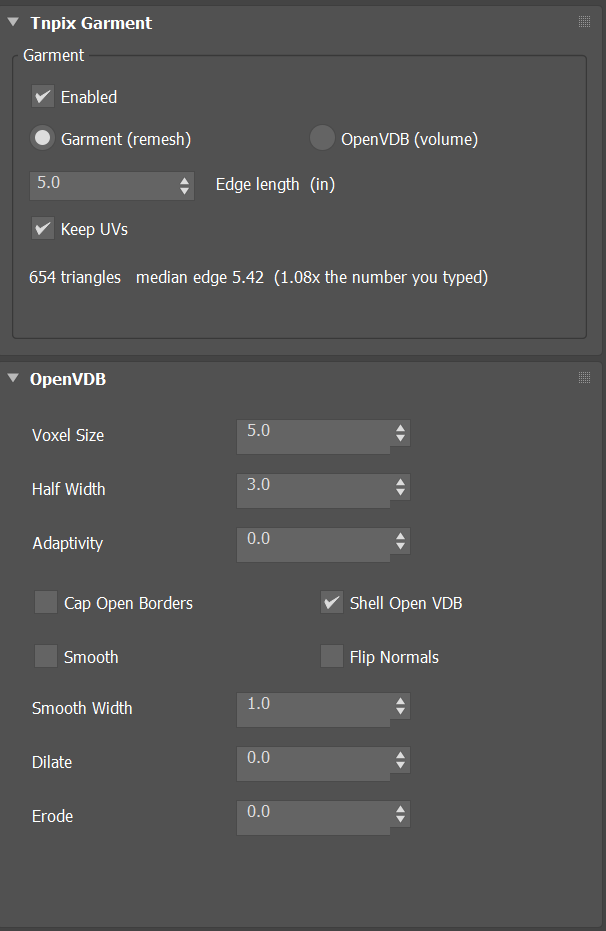
Tnpix Garment rollout
- Enabled Default on
- Turns the conversion off without removing the modifier, so you can compare with the original mesh. The conversion is suspended, not lost.
- Garment (remesh) Default
- Rebuilds the surface as an even triangle mesh at the edge length below. Use it when the incoming garment has uneven or badly shaped polygons.
- OpenVDB (volume)
- Rebuilds the surface from a volume instead: closes gaps, thickens thin shells and re-surfaces geometry the solver cannot use as it stands. Its settings are on the OpenVDB rollout.
- Edge length Default 5.0
- The target triangle size of the remesh, measured on the mesh in its own units. Smaller values give more detail and a slower solve; larger values are coarser and faster.
- Keep UVs Default on
- Carries the original texture coordinates through the remesh. Leave it on unless the UVs are what you are rebuilding.
- Status line
- Reports the result of the conversion.
OpenVDB rollout
Used when the mode is OpenVDB (volume).
- Voxel Size Default 5.0
- The size of the volume's voxels. Smaller voxels keep finer detail and cost more.
- Half Width Default 3.0
- The half width of the band around the surface that the volume stores, in voxels, from 1 to 100.
- Adaptivity Default 0
- 0 re-surfaces with uniform triangles; higher values, up to 1, let flat areas use fewer, larger triangles.
- Cap Open Borders Default off
- Closes the open borders of the mesh before it is turned into a volume.
- Shell Open VDB Default on
- Treats an open mesh as a thin shell so that it can be turned into a volume.
- Smooth Default off / Smooth Width Default 1.0
- Smooths the volume before it is re-surfaced, over the given width.
- Flip Normals Default off
- Reverses the normals of the result.
- Dilate / Erode Default 0
- Grows or shrinks the volume before it is re-surfaced.
Simulate at the density the shot needs and add detail for the render above the Solver, with TurboSmooth or with Tnpix Wrap on a high-resolution copy.