Chapter 3 · Modifier Reference
3.19Tnpix Threads
The Tnpix Threads modifier adds the threads of the weave. Where the cloth tears, warp and weft threads stick out of the crack and some still span it; along painted hems a fringe can hang. Every thread is a thin tube, built into the cloth mesh or into an object of its own, and in Dynamic each one hangs, swings, collides and snaps by itself after every cloth frame.
Location: Modify panel ▸ Modifier List ▸ Tnpix Threads (directly above the Tnpix Solver)
Tnpix Threads reads the cloth from the Tnpix Solver below it, frame by frame, and needs one on the same stack. It never changes the simulation: the cloth is exactly the same with the threads on or off. Threads at a tear need a Tnpix Tear on the cloth; a fringe along painted edges needs none. On a shared Solver each cloth grows its own threads from its own part of the Solver group.
To add threads to a tearing cloth:
- Set up a cloth that tears (see Tearing in Chapter 5).
- Add Tnpix Threads directly above the Tnpix Solver. Where it tears is on.
- Set Warp every and Weft every to the spacing of the threads and Thread length to how far a loose thread reaches, in scene units.
- Play from the first frame. The threads appear on the frame a seam tears and grow as the crack opens.
- In the Tear and Motion rollout, choose the Material of the thread and Dynamic or Follow the cloth.
- To give the tubes their own material, or to keep them out of the modifiers above, click Make the threads object in the Output rollout.
To fringe a hem:
- Paint the hem at 0.5 or more in a Tnpix Channel.
- Add Tnpix Threads, turn on Along painted edges and choose the channel. With <none - every open border>, every open border of the cloth is fringed.
- Turn off Where it tears if the cloth should have only the fringe.
Interface
A new Tnpix Threads takes its lengths in the scene's unit; the defaults below show the inch values.
Tnpix Threads rollout
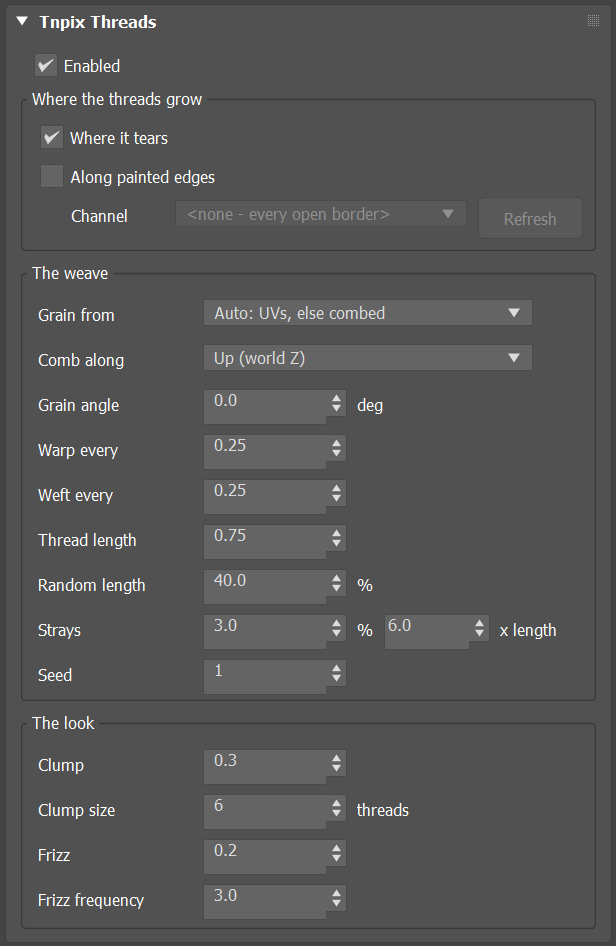
- Enabled Default on
- Off, the cloth leaves this modifier exactly as it came in.
Where the threads grow group
- Where it tears Default on
- Threads are born on the frame a seam tears, at the seams the Solver reports torn. Before the first tear there is nothing to see. Needs a Tnpix Tear on the cloth.
- Along painted edges Default off
- A fringe on the cloth's open borders inside the channel below: hems, holes and garment edges, never a crack. The fringe is there at full length from the first frame.
- Channel / Refresh
- The channel that marks the borders to fringe: an edge whose two points are both painted at 0.5 or more. <none - every open border> fringes every open border. Available while Along painted edges is on. A channel that is no longer on the stack is listed as [MISSING from this stack] and no fringe is made.
The weave group
- Grain from Default Auto: UVs, else combed
- Which way the threads run. Auto: the UVs of map channel 1 on every face whose UVs are sound; a face with no UVs or broken ones takes the direction of the sound faces around it, or the comb where there are none. UVs only: each pattern piece's own grain from map channel 1; a face without UVs grows no threads. Combed only: one direction laid over the whole garment and smoothed; it needs no UVs and never jumps at a seam.
- Comb along Default Up (world Z)
- The axis the combed grain follows: Up (world Z), World X or World Y. Up suits a garment on a standing figure. Unavailable with UVs only.
- Grain angle Default 0
- Turns the grain around each face, in degrees, from −180 to 180. 45 is a bias cut.
- Warp every / Weft every Default 0.25 in
- The spacing between the threads that run along the grain (warp) and across it (weft). A smaller spacing makes more threads; see Thread cap.
- Thread length Default 0.75 in
- How far a loose thread reaches out of the cloth.
- Random length Default 40%
- Each thread's length varies by up to this share, longer or shorter. Range 0 to 100.
- Strays Default 3% / x length Default 6
- This share of the threads is much longer than the rest; the second value says how many times longer, from 1 to 100.
- Seed Default 1
- Another arrangement of the same settings: which threads are long, clumped or holding, and which short edges carry a thread.
The look group
- Clump Default 0.3
- How strongly neighbouring threads bunch into strands: 0 keeps every thread apart, 1 makes a strand's tips meet.
- Clump size Default 6
- How many threads make one strand, from 2 to 100.
- Frizz Default 0.2
- How far a thread wanders off straight, as a share of its length, from 0 to 2. It rides on top of the motion, so a swinging thread keeps its frizz.
- Frizz frequency Default 3
- How many kinks a thread has along its length, from 0 to 50.
Tear and Motion rollout
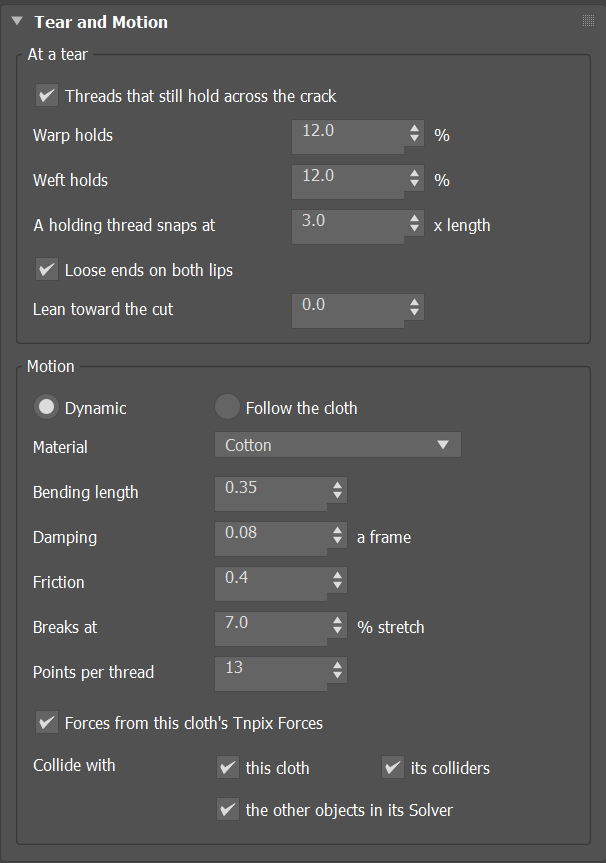
At a tear group
- Threads that still hold across the crack Default on
- Some threads span the crack from lip to lip. Off, every torn seam leaves loose ends only.
- Warp holds / Weft holds Default 12%
- The share of the crack's warp or weft threads that still span it. One family at 0 gives the look of ripped denim. Unavailable while holding is off.
- A holding thread snaps at Default 3 x length
- As the lips part, a taut holding thread first pulls more length out of the weave, up to this many times its own length; past that it stretches, and it snaps at Breaks at. Range 1 to 100.
- Loose ends on both lips Default on
- A torn seam without a holding thread leaves a loose thread on each side.
- Lean toward the cut Default 0
- 0: every thread sticks out along its own grain, as torn cloth does. 1: every thread points straight out of the cut, like a brushed trim. In between, a blend.
Motion group
- Dynamic / Follow the cloth Default Dynamic
- Dynamic: each thread is simulated after each cloth frame; it hangs by its own weight, swings, collides and slides. Follow the cloth: each frame every thread takes the shape it would rest in on the cloth there, with the same material, without swinging. Either way the cloth itself is untouched.
- Material Default Cotton
- Starting values for Bending length, Damping, Friction and Breaks at, from five kinds of thread (see the table below). Change any of the four and the list reads Custom; choosing Custom changes nothing.
- Bending length Default 0.35 in
- How stiff the thread is, as a length: a thread shorter than this stands out of the cloth, a longer one droops; a thread twice this long droops about 41 degrees. So long strays hang while short fringe stands, from one number.
- Damping Default 0.08
- The share of a thread's swing lost each frame, at 30 frames per second (the loss per second is kept at other frame rates and at any substep count). Range 0 to 1. Dynamic only.
- Friction Default 0.4
- How much a thread grips what it lies on: its own cloth, a collider, another object. 0 slides off; 1 stays where it lands. Range 0 to 2. Dynamic only.
- Breaks at Default 7% stretch
- How far a thread stretches before it snaps, as a share of its length. A holding thread pulled taut by the widening crack gives this much past its Snaps at length, then breaks, and its halves whip back to their lips. A loose thread caught between two surfaces as the cloth moves away gives this much, then its outer piece breaks off, falls free and lands. Range 0 to 1000.
- Points per thread Default 13
- How many simulated points carry each thread, from 3 to 64. More points bend more smoothly and cost more.
- Forces from this cloth's Tnpix Forces Default on
- The wind and other forces on the cloth act on its threads too, where each thread grows. Gravity is always the Solver's. Dynamic only.
- Collide with: this cloth / its colliders / the other objects in its Solver Default on
- The threads stay off the cloth they grow from, except right around a thread's own root, which it grows out of; off the objects in the cloth's Tnpix Collision list, with their thickness; and off every other object simulated in the same Solver, where each stands within the frame. With the Solver's Unlimited ground (Z = 0) on, the threads land on that floor too, with their own Friction. Half the Thread thickness is kept off every surface, and no thread passes through its own cloth. Threads do not collide with each other.
| Material | Bending length | Damping | Friction | Breaks at |
|---|---|---|---|---|
| Cotton | 0.35 in | 0.08 | 0.40 | 7% |
| Wool | 0.25 in | 0.15 | 0.60 | 30% |
| Silk | 0.12 in | 0.05 | 0.20 | 20% |
| Linen | 0.60 in | 0.10 | 0.45 | 3% |
| Synthetic | 1.00 in | 0.04 | 0.25 | 25% |
The Bending length of a material is converted to the scene's unit when you choose it. The values are starting points taken from textile references.
Output rollout
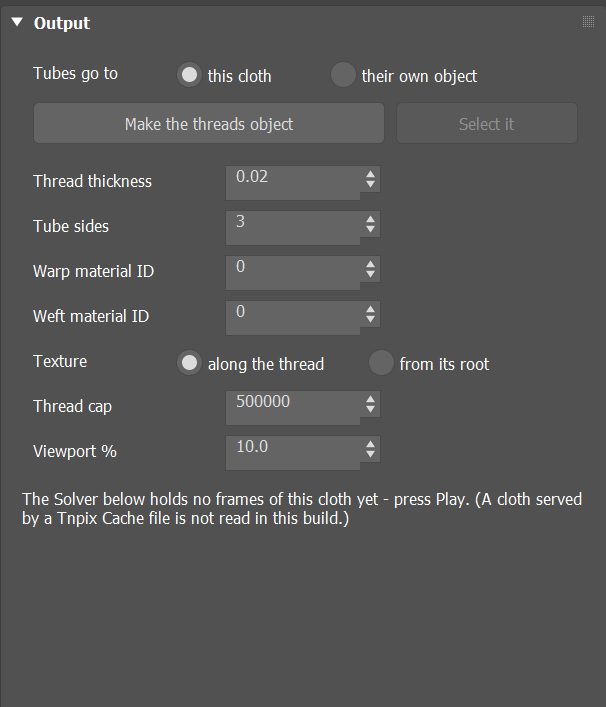
- Tubes go to Default this cloth
- this cloth: the tubes are part of the cloth mesh and wear its material. their own object: the cloth leaves this modifier exactly as the Solver made it, so a Tnpix Wrap, or any modifier above, sees the cloth alone; the tubes appear in the threads object.
- Make the threads object / Select it
- Make the threads object creates a Tnpix Threads Object named after the cloth, for example TornSheet_Threads: a child of the cloth with its move, rotate and scale locked, the cloth's material and wire colour, showing this modifier's tubes. It also sets Tubes go to their own object; one undo step. Select it selects that object. Each Tnpix Threads on a cloth makes its own object.
- Thread thickness Default 0.02 in
- Each thread's thickness. The tubes are built at it and taper to half at the tip, and collision keeps half of it off every surface.
- Tube sides Default 3
- How many sides each tube has, from 3 to 16.
- Warp material ID / Weft material ID Default 0
- The material ID the warp or weft tubes take. 0 is the ID of the face the thread grows from.
- Texture Default along the thread
- along the thread: each tube has its own UVs in map channel 1, around it and from root to tip, so a thread texture runs along every thread. from its root: each thread takes the cloth's texture where it grows; every map channel the cloth carries, its UVs and its vertex colours, is read at the thread's root and given to the whole thread, so a textured cloth sends each thread out in the colour of its spot. A cloth without UVs keeps the threads' own, and the status says so. In both, the third coordinate (W) of map channel 1 numbers the thread.
- Thread cap Default 500,000
- The most threads this Tnpix Threads makes, from 1 to 2,000,000. When the cracks would need more, every crack gets the same thinner density instead of the first cracks taking them all: none is left bare, and the same threads are made on every play. While you play forward the density follows what has torn so far (a first play can make up to four times the cap); going back a frame, or starting a render, evens it out over every crack. Snapped halves and broken-off pieces do not use it up. The status line says when it thins.
- Viewport % Default 10
- The share of the threads the viewport shows, from 0.1 to 100. Always the same threads, spread evenly over every crack and edge, so the look does not flicker from frame to frame. Every thread is still simulated, and a render (Render, Render Setup, a batch or network render) makes all of them, whatever this says. 100 shows all of them in the viewport too.
- Status
- What the threads did on this frame, one line each: the cracks, threads and holding threads; the painted edges; where the grain came from (UVs, filled or combed faces); the motion and the tube faces of every thread; the cap and the viewport share while they thin; and, with their own object, where the tubes are.
The threads object
A Tnpix Threads Object shows the tubes of a cloth's Tnpix Threads when Tubes go to is set to their own object. Make the threads object creates and connects one; you can also create one from Create panel ▸ Geometry ▸ Tnpix ▸ Tnpix Threads Object and pick the cloth. The object draws the tubes where they are in the world, wherever its own node stands, so a separate material, a separate render setting or a Tnpix Cache can be given to the threads alone.
Tnpix Threads Object rollout
- Threads from
- The cloth whose Tnpix Threads this object shows. Pick another cloth to show its threads instead; only an object that carries a Tnpix Threads can be picked.
- Status
- Which cloth and Threads it shows and how many tubes and faces it has on this frame, or why it shows nothing: no cloth picked, the cloth carries no Tnpix Threads (or no longer carries the one this object was made from), or that Threads puts its tubes in the cloth.
If the threads object is deleted, Make the threads object becomes available again and the status of Tnpix Threads says that no object shows the tubes: until you make another, they appear nowhere.
Working with threads
- What re-runs. A change to how the threads grow or move, to Points per thread, Thread thickness, the cap or the channel, or a new simulation, runs the threads again from the first frame. Clump, Frizz, Tube sides, the material IDs, Tubes go to, Texture and Viewport % only redraw.
- Memory and cost. Every frame's threads are kept in memory. At the defaults each thread is a tube of 144 triangles; dense spacing on a long tear makes millions, which is what Viewport % and Thread cap are for.
- A Tnpix Cache below. The threads read the Solver's frames, and a cloth that plays from a Tnpix Cache file has none: no threads are made. To keep the threads of a saved simulation, cache the threads object itself: add a Tnpix Cache to it and save, as for any mesh.
- Tnpix Wrap. With Tubes go to this cloth, a Tnpix Wrap that uses the cloth as a proxy reads the cloth without its tubes. Put the threads in their own object when other modifiers above should work on the cloth alone.
- Motion blur. Between two frames, a threads mesh that is alive in both moves from one to the other; a thread born, snapped or broken in between changes at the frame. A threads object played from a Tnpix Cache blurs the same way.
- After the last simulated frame the threads of the last frame are shown.