Chapter 3 · Modifier Reference
3.15Tnpix Rigid
The Tnpix Rigid modifier makes parts of a garment solid: buttons, buckles, a stiffened collar, an armour plate. Each piece keeps its modelled shape, moves as one body and has weight, while the cloth around it stays cloth. Pieces keep their collisions, self collisions and pins.
Location: Modify panel ▸ Modifier List ▸ Tnpix Rigid
Interface
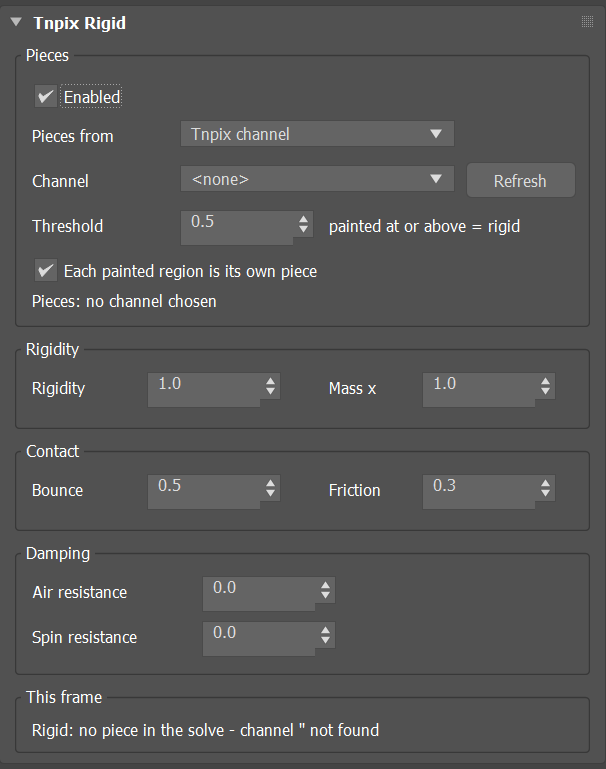
Tnpix Rigid rollout
Pieces group
- Enabled Default on
- Turns the rigid hold off without removing the modifier; the cloth simulates as if it were not there.
- Pieces from Default Tnpix channel
- Tnpix channel takes the pieces from a painted channel. Mesh elements makes every separate element of the mesh a piece, except the largest (the cloth itself) and any element with more than a quarter of the points: the quick route when the hard parts are already modelled as separate elements.
- Channel / Refresh
- The painted channel that marks the rigid regions. Paint 1 where the cloth is rigid and leave the rest free.
- Threshold Default 0.5
- A point is rigid where the channel's paint is at or above this value.
- Each painted region is its own piece Default on
- On, every connected painted region is its own piece: a buckle and two straps are three pieces. Off, everything painted is one piece.
- Status line
- The pieces the paint makes on this mesh, counted while you paint. A piece needs at least three points.
Rigidity group
- Rigidity Default 1.0
- How firmly each piece holds its rest shape: 1 keeps it exactly; lower values let it yield a little, like a stiff leather patch rather than a steel plate; 0 is off. The result does not change with Substeps. Animatable.
- Mass x Default 1.0
- The pieces' points weigh this many times the fabric around them, so a buckle swings like a buckle. 1 is the fabric's own weight. Range 0.01 to 1000.
Contact group
- Bounce Default 0.5
- How much of its speed a piece keeps when it hits a collider, from 0 to 1. 0 lands dead; 0.5 bounces back to about a quarter of the drop; 1 to the full height.
- Friction Default 0.3
- How much a piece grips what it presses on. 0 is ice; higher values stop sliding, so a ball rolls and a box tips instead of skating. It is the pieces' own friction in object and self collision; a friction override on Tnpix Collision or Tnpix Self Collision still wins. Range 0 to 10.
Damping group
- Air resistance Default 0
- Slows a piece's motion: 0 is off, 1 lets its speed fall to about a third each second, 5 stops it within a second. It slows a fall too. Range 0 to 100.
- Spin resistance Default 0
- Slows a piece's spin the same way; use it to stop a ball rolling on after it lands. Range 0 to 100.
This frame group
- Status line
- What the Solver received for this garment when the simulation started: pieces and points.
Bounce 0.5 and Friction 0.3 match the defaults of 3ds Max MassFX, so rigid pieces behave like the rigid bodies you already know.