Chapter 3 · Modifier Reference
3.20Tnpix Wrap
The Tnpix Wrap modifier makes a high-resolution mesh follow one or more low-resolution proxies. Simulate a light proxy, then let Wrap carry the detailed garment along with it: every point of the high-resolution mesh remembers its place on the nearest proxy and follows it, including across tears, and a shell's cuts are closed so a tear shows the cloth's edge.
Location: Select the high-resolution mesh ▸ Modify panel ▸ Modifier List ▸ Tnpix Wrap
To drive a detailed garment with a simulated proxy:
- Simulate a low-resolution version of the garment (the proxy), and save it to a Tnpix Cache for speed.
- Place the high-resolution garment so that it lines up with the proxy at one frame, usually the first.
- Select the high-resolution garment and add Tnpix Wrap.
- Click Add and pick the proxy. Add more proxies if the garment is made of several.
- Set Bind at to the frame where the meshes line up and click Bind.
- Play. The detailed garment follows the proxy.
Interface
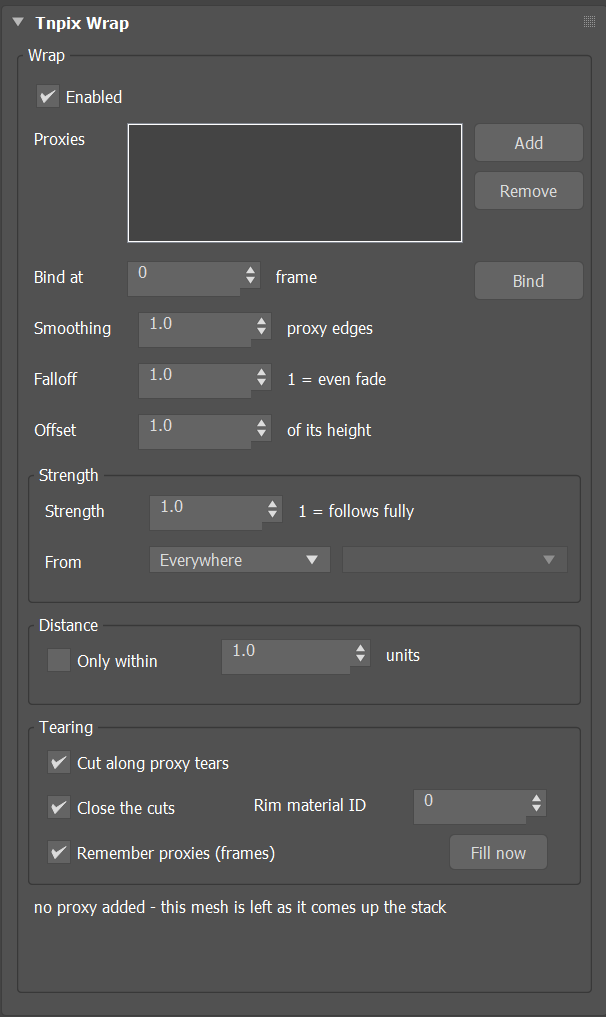
Tnpix Wrap rollout
Wrap group
- Enabled Default on
- Off, this mesh is left as it comes up the stack.
- Proxies / Add / Remove
- The low-resolution meshes that drive this one: a Tnpix cloth, a cache, or any deforming mesh whose faces stay the same. Each point follows the closest proxy. Add picks a proxy in the viewport; Remove takes the selected one off the list, and its points bind to the remaining proxies at the next Bind.
- Bind at Default frame 0 / Bind
- The frame where this mesh and the proxies line up; every point remembers its place on a proxy from that frame. Bind binds again; use it after editing this mesh or a proxy's rest shape.
- Smoothing Default 1.0
- How far around its face a point blends the neighbouring proxy faces, in proxy edge lengths, from 0 to 4. 0 rides one face and is stiff; 1 to 2 smooths over the proxy's facets. It never blends across a tear.
- Falloff Default 1.0
- How fast a neighbouring face's influence fades with distance. 1 fades evenly to the edge of the Smoothing reach; higher values hold tighter to the nearest face. Range 0.1 to 10.
- Offset Default 1.0
- How much of its height above the proxy a point keeps: 1 all of it, 0 pressed onto the proxy surface. Animatable.
Strength group
- Strength Default 1.0
- How far each point moves from where it came up the stack to where the wrap puts it: 1 fully, 0 not at all. Animatable.
- From Default Everywhere
- Where the per-point strength comes from: one value everywhere, the vertex colour (red), or a Tnpix channel painted below this modifier. In a channel, white is full strength and black is not moved.
Distance group
- Only within Default off, 1.0
- Points farther than this from every proxy at the Bind frame are left alone. The distance is in scene units, measured at the Bind frame; the status line shows the farthest bound point.
Tearing group
- Cut along proxy tears Default on
- When a proxy tears, this mesh is cut along its own edges nearest the tear. Off, it stays whole and stretches across the gap.
- Close the cuts Default on
- Where this mesh is a shell, two layers with the cloth's thickness between them, each cut along a proxy tear is closed: a strip of faces joins a layer's cut edge to its twin on the other layer, so the tear shows the cloth's edge instead of the hollow between the layers. Both layers are cut alike, and the inner layer rides the same torn piece as the outer one. A mesh of one layer has nothing to join and stays as it is. Works with Cut along proxy tears on.
- Rim material ID Default 0
- The material ID of the faces that close the cuts. 0 takes the ID of the outer face beside each one. The closing faces also take that face's smoothing group and the UVs of the points they join.
- Remember proxies (frames) Default on
- Keeps each proxy's shape per frame in memory the first time the frame is seen, so playing or scrubbing it again costs only the wrap. The memory has no limit: it keeps every frame it has seen until the scene closes, about 12 bytes per proxy point per frame (a 400,000-point proxy uses 4.8 MB a frame, 1.7 GB over 360 frames) - allow for it on a render node that renders a long sequence in one session. The memory is cleared when a proxy or its animation changes, or when you clear the check box.
- Fill now
- Evaluates every frame of the animation range into the proxy memory now, so the first play is already from memory. Esc stops it; what was filled stays. A proxy that is a live Tnpix simulation is refused: save it to a Tnpix Cache first.
- Status line
- What is bound and how far the farthest bound point is; after a tear, how many proxy edges tore, how many points of this mesh were split, and how many faces close the cuts, or that the mesh is one layer and there is nothing to close.
A shell is recognised on its own at the Bind: Close the cuts looks for faces that have a twin facing the other way one thickness behind them, as a Shell modifier makes. Borders that were open at rest stay open, and so does an edge whose twin did not open; on a rim with several segments, small holes beside the strip are filled.
- Motion blur. Between two frames the Wrap keeps one cut, the one its proxies' tears give, so a torn mesh has the same points through the shutter and blurs.
- A proxy with thread tubes. When a proxy carries Tnpix Threads whose tubes go to the cloth, the Wrap reads the cloth without the tubes and follows it as usual.